Non-Emergency Medical Transportation (NEMT) providers handle sensitive patient data daily, including names, addresses, appointment details, and health conditions. This data is classified as Protected Health Information (PHI) under HIPAA, and mishandling it can lead to legal, financial, and reputational risks. Compliance is non-negotiable for maintaining partnerships with Medicaid brokers like Modivcare and MTM, avoiding claim denials, and staying competitive.
Here’s a quick breakdown of the key steps to HIPAA compliance for NEMT providers:
- Understand PHI: Data like patient names, pickup/drop-off locations, and appointment times must be protected.
- Business Associate Agreements (BAAs): Required with brokers, healthcare facilities, and software vendors.
- Safeguards: Implement administrative (role-based access, audit trails), technical (encryption, multi-factor authentication), and physical (device security) protections.
- Secure Software: Use platforms with signed BAAs, role-based access controls, audit logs, and secure driver apps.
- Staff Training: Tailor training to roles, ensuring drivers, dispatchers, and admins understand HIPAA risks and procedures.
- Secure Devices and GPS Data: Use company-issued devices, encrypted apps, and HIPAA-compliant GPS systems to protect PHI in the field.
- Incident Response: Have a clear plan for identifying, documenting, and addressing breaches.
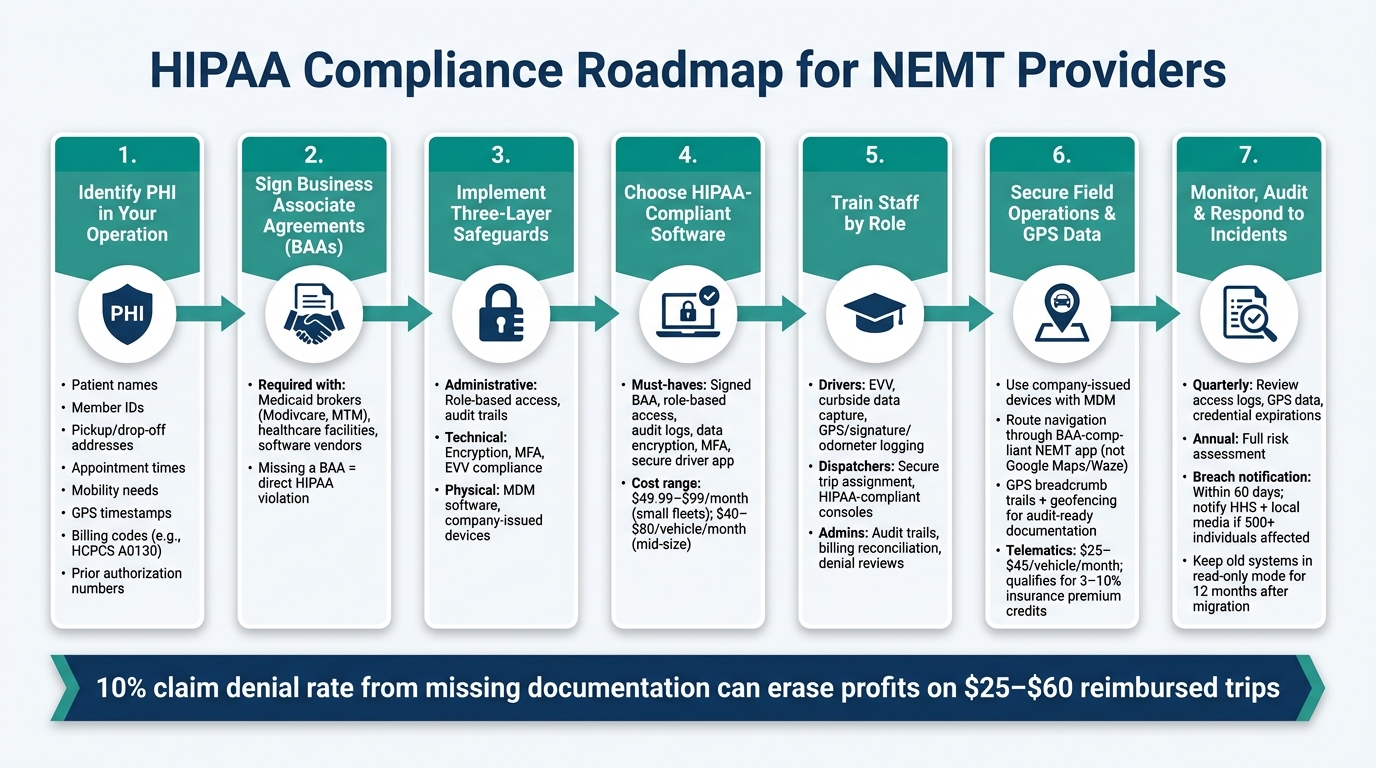
HIPAA Compliance Roadmap for NEMT Providers
HIPAA Requirements for NEMT Providers
What Counts as PHI in NEMT Operations
In Non-Emergency Medical Transportation (NEMT), Protected Health Information (PHI) shows up in nearly every part of the operation. PHI includes any data that identifies a patient and connects them to healthcare services – think patient names, diagnoses, and other related details.
For NEMT providers, PHI can include patient names, Member IDs, pickup and drop-off addresses (which might reveal locations like dialysis centers or oncology clinics), appointment times, and specific mobility needs such as wheelchair or stretcher accommodations. It also extends to electronic PHI (ePHI), such as GPS-stamped timestamps, electronic signatures, odometer readings, billing codes like HCPCS A0130, and prior authorization numbers stored or shared through your systems.
If a piece of information identifies a patient and ties them to healthcare, it qualifies as PHI and must be securely protected. This wide-ranging definition underscores the importance of strict HIPAA compliance for NEMT providers.
Why NEMT Providers Are Considered Business Associates
Since NEMT providers handle PHI on behalf of health plans, Medicaid brokers, and healthcare facilities, they are classified as Business Associates under HIPAA. This designation comes with legal obligations to maintain Business Associate Agreements (BAAs) and follow HIPAA standards.
Business Associates must comply with HIPAA’s Privacy, Security, and Breach Notification Rules. They are also required to have a signed BAA with every covered entity and any software vendor that handles rider data. The U.S. Department of Health and Human Services explains:
“Covered entities and business associates must protect health information under HIPAA rules. While software alone does not make an operation compliant, the right platform can support better processes through role-based access, audit trails, and secure records.”
Skipping a BAA is not a minor oversight – it’s a direct violation of HIPAA. Before adopting any scheduling, billing, or GPS platform, confirm that the vendor will sign a BAA that specifically addresses NEMT operations.
Required Safeguards Under HIPAA
HIPAA breaks its security requirements into three categories: administrative, physical, and technical. Each one directly influences how NEMT providers handle and protect data.
| Safeguard Category | Required Component | NEMT Application |
|---|---|---|
| Administrative | Role-Based Access | Dispatchers can view full trip details; drivers only see their assigned manifests |
| Administrative | Audit Trails | Track all changes to trip records for Medicaid audit compliance |
| Technical | Encryption | Secure rider data during API transfers from brokers like Modivcare or MTM |
| Technical | EVV Compliance | Use GPS and digital signatures to verify completed medical transports |
| Physical | Device Management | Ensure driver apps are secured and used exclusively for authorized tasks |
All these safeguards need to align with your operations to reduce risks effectively.
One often-overlooked area is multi-factor authentication (MFA). Employees accessing cloud-based dispatch systems containing rider health information should verify their identity with more than just a password. Additionally, using personal apps like Google Calendar or Apple Calendar to track rider appointments is a clear HIPAA violation. As RouteGenie explains, “Storing a rider’s name alongside a medical appointment time and location on a personal Google or Apple account isn’t a gray area; it is a clear violation.”
The takeaway here? HIPAA compliance in NEMT is an ongoing effort. It requires the right tools, agreements, and access controls working together at every level of your operation.
sbb-itb-af83355
Building a HIPAA-Compliant Dispatch and Scheduling Workflow
Mapping PHI Data Flows in Your Operation
Understanding how Protected Health Information (PHI) moves through your operation is crucial. PHI flows through various stages: it might come in through broker portals, EDI feeds, or manual entry, proceed to dispatch for matching riders with vehicles, transfer to drivers for trip execution, and finally land in billing when claims are generated.
To ensure compliance, document every step of the PHI lifecycle. This includes identifying who has access to the data, where it is stored, and how it transitions between stages. Gaps often exist in these processes – like a dispatcher saving details in a personal spreadsheet or a driver texting a patient’s address to a subcontractor. These gaps pose serious risks.
Eliminate these vulnerabilities by automating data transfers. Use EDI or API integrations to pull trip data directly from brokers such as Modivcare or MTM, reducing the need for manual input. Once you’ve mapped out these data flows, the next step is to compare NEMT software vs. manual dispatch to select a platform that supports secure and compliant workflows.
Choosing HIPAA-Compliant NEMT Software
The right software plays a key role in maintaining secure PHI workflows. Not every dispatch platform is designed with HIPAA compliance in mind, so it’s important to focus on essential NEMT dispatch software features that meet specific standards. Here are some must-have features:
| Software Criteria | Why It Matters |
|---|---|
| Signed BAA | Ensures the vendor is legally obligated to adhere to HIPAA standards. |
| Role-Based Access Control | Restricts PHI access to only those who need it for their role. |
| Audit Logs | Tracks PHI access for accountability and audit readiness. |
| Data Encryption & MFA | Protects PHI during transmission and storage, and prevents unauthorized access. |
| Secure Driver App | Replaces unsecured methods like paper logs for capturing field data. |
Tools like NEMT Cloud Dispatching, TripMaster, and RouteGenie offer these features and are built to support HIPAA-compliant operations. Pricing varies depending on fleet size and features. Smaller fleets might find plans starting at $49.99–$99 per month, while mid-sized operations can expect costs of $40–$80 per vehicle per month.
“The cheapest platform that misses 8% of broker billing costs more than the most expensive one that catches it.” – NEMTInsurance.com
Secure Communication Practices for Dispatchers and Drivers
Even with secure workflows, communication practices can create vulnerabilities. Many operations still use unencrypted methods like standard text messages, personal email, or radio calls to share PHI. For example, a dispatcher texting a driver a patient’s name, address, and appointment details via SMS exposes unencrypted PHI, which violates HIPAA standards.
To address this, switch to an encrypted NEMT app for all dispatcher-to-driver communication. These apps keep trip details, navigation, and updates within a secure environment, complete with an audit trail. They also allow for automated notifications, such as sending riders their ETAs securely without exposing PHI to third-party services.
Additionally, inefficient or unsecured workflows can lead to errors like missing signatures or mileage mismatches, which in turn can cause a 10% claim denial rate. Considering trips often average $25–$60, such errors can quickly eat into your bottom line.
Securing Mobile Devices, GPS Systems, and Field Data
Reducing PHI Exposure in the Field
When drivers access tablets or shared manifests, Protected Health Information (PHI) can be exposed – whether through a visible digital screen, an unattended paper manifest, or an unprotected GPS display. Switching from paper trip logs to digital manifests secured within a driver app eliminates one of the most common vulnerabilities in the field.
Using personal devices to look up addresses or take photos of trip sheets creates risks that are difficult to monitor. Instead, company-issued devices with locked-down settings provide a controlled environment for PHI. Addressing these field risks is a critical first step toward effective mobile device management.
Configuring Mobile Devices and Apps for Security
Mobile Device Management (MDM) software is a key tool for securing driver hardware on a large scale. MDM platforms allow administrators to manage devices remotely, controlling app installations, enforcing screen locks, wiping lost or stolen devices, and preventing data from being transferred to personal accounts. Without MDM, a single lost tablet could expose hundreds of patient records.
Driver apps should also incorporate Multi-Factor Authentication (MFA) and role-based access to ensure drivers only see their assigned trips, not the entire patient manifest. Additionally, apps should block trip completion until essential fields – like member signatures, odometer readings, and timestamps – are filled in. Missing field data can lead to claim denials, which can account for up to 10% of total trips.
“The platform has to track credential expirations, vehicle inspection due dates, and Electronic Visit Verification (EVV) where states require it – all while keeping member data inside a HIPAA-aware system.” – Pulse Tech Stacks
Another critical feature is offline mode. Drivers often encounter areas with weak cellular coverage. Apps that can’t function offline force drivers into insecure workarounds, like handwritten notes or personal phone photos, which compromise HIPAA compliance. Choose apps that locally encrypt data – like signatures, GPS points, and timestamps – before syncing once a connection is restored. Once devices are properly secured, GPS data management must also meet HIPAA standards.
Managing GPS Data Under HIPAA
Location data tied to patient trips – such as pickup addresses, destination clinics, and timestamps – qualifies as PHI if it can be linked to an individual. This means your GPS system isn’t just a navigation tool; it’s a PHI handler and must be protected like your dispatch software.
The most secure approach routes all navigation through the NEMT driver app, ensuring destination data stays within a Business Associate Agreement (BAA)-compliant environment. Standalone apps like Google Maps or Waze lack BAAs and pose unnecessary risks. GPS systems should also generate breadcrumb trails – timestamped location points that align with key events like pickups and drop-offs. These trails provide audit-ready documentation for CMS and state Medicaid programs. Adding geofencing helps automate arrival and departure logs, reducing manual errors and ensuring timestamps are reliable.
| GPS Configuration Feature | Why It Matters for HIPAA |
|---|---|
| Integrated in-app navigation | Keeps destination data within a BAA-compliant environment |
| GPS breadcrumb trails | Provides an audit trail for trip verification and claim support |
| Geofencing triggers | Automates timestamp logging, reducing documentation errors |
| Offline encryption | Protects location data when connectivity is lost |
| Role-based access to trip history | Restricts access to historical GPS and PHI data |
Providers can qualify for 3%–10% premium credits by using verified telematics. Telematics hardware from companies like Samsara or Geotab typically costs $25–$45 per vehicle per month, but these expenses can be partially offset by reduced premiums and fewer claim rejections.
Policies, Staff Training, and Ongoing Monitoring
Key HIPAA Policies Every NEMT Provider Needs
Technology alone won’t guarantee HIPAA compliance. To truly safeguard Protected Health Information (PHI) and prepare for audits, NEMT providers need a solid set of written policies that guide how data is handled.
These policies should include access control (outlining who can access data and why), acceptable use (prohibiting PHI storage on personal devices or accounts), and Business Associate Agreements (BAAs) (requiring that all vendors handling PHI sign a BAA). Another critical piece is a detailed incident response plan to address breaches or security violations. Don’t forget about data retention – if you’ve recently upgraded to new software, keep older systems in a read-only mode for at least 12 months. This ensures you can resolve billing disputes and defend against audits when needed.
Policies, however, are only effective when paired with staff training that translates these rules into everyday actions.
Role-Based HIPAA Training for Staff
Each staff role comes with unique HIPAA risks, so training must address the specific ways employees interact with PHI.
| Staff Role | Training Focus | Key Tools |
|---|---|---|
| Drivers | Curbside data capture, EVV, securement certs | Mobile apps with GPS, signature capture, and odometer logging features |
| Dispatchers | Secure trip assignment, live board management | HIPAA-compliant dispatch consoles with role-based access |
| Administrators | Audit trails, billing reconciliation, denial reviews | Reporting dashboards, EDI 837 claim scrubbing, and audit logs |
For example, drivers need to understand that capturing a signature, odometer reading, and GPS timestamp isn’t just a software requirement – it’s essential for compliance.
“Compliance lapses can immobilize fleets and trigger broker audits, underscoring the value of this training layer.” – Pulse Tech Stacks
Once policies and training are in place, regular audits are the next step to ensure ongoing compliance.
Routine Audits and Risk Assessments
Routine audits and risk assessments are essential for spotting vulnerabilities and ensuring your policies and training are effective. A quarterly review of access logs, GPS breadcrumb data, and credential expirations can help identify and fix issues before they become major problems.
Risk assessments should be conducted at least once a year or whenever there are significant changes, such as adopting new software, switching vendors, or expanding your fleet. These assessments aim to pinpoint potential PHI risks, whether it’s a driver using a personal device or a vendor operating without a valid BAA. Many NEMT software platforms now offer tools like automated credential alerts and compliance dashboards, making these checks quicker and easier. For instance, the Great Lakes PACE program reported that after integrating automated dispatch tools, their daily schedule creation time dropped from 6 hours to just 45 minutes, allowing more time to focus on compliance.
Responding to Security Incidents and Breaches
Common Security Incidents in NEMT
In the Non-Emergency Medical Transportation (NEMT) sector, security incidents often stem from routine mistakes rather than high-profile data breaches. For example, a driver might lose a paper manifest containing sensitive rider information, a dispatcher could access trip records they aren’t authorized to view, or an employee might store pickup schedules in a personal calendar app – actions that clearly violate HIPAA rules, as discussed earlier.
Another common issue involves unencrypted tablets without multi-factor authentication (MFA), which leave stored trip records vulnerable. Under HIPAA, such scenarios may be classified as security incidents (involving unauthorized access attempts) or reportable breaches (confirmed unauthorized acquisition of Protected Health Information, or PHI). Each type demands a tailored response.
Incident Response and Breach Notification Steps
When a potential breach occurs, quick action and thorough documentation are critical. Start by identifying the PHI involved – this could include rider names, medical appointment details, and pickup or drop-off locations. Use your software’s audit logs to track who accessed the data and when. For more on audit log practices, refer to earlier sections.
Here’s how to handle such situations effectively:
- Contain the incident and consult your BAA
Immediately revoke compromised credentials, use remote wiping tools if necessary, and review your Business Associate Agreement (BAA) with your software vendor to understand their reporting obligations and timelines. - Assess and document the breach
Collect digital evidence such as GPS breadcrumb trails, electronic signatures, and timestamps to create a clear record for regulators. - Notify affected parties
HIPAA mandates that individuals impacted by a breach be informed within 60 days of its discovery. If the breach involves 500 or more individuals in a single state, you must also notify the Secretary of HHS and local media. For smaller breaches, log the incident and report it during HIPAA’s annual review process.
Keep in mind that state-level regulations may impose additional requirements, so always check with your state Medicaid agency for specifics.
Preventing Future Violations
After addressing a breach, take immediate steps to strengthen your compliance framework. This involves reviewing the breach to pinpoint gaps in policies, training, or safeguards.
Here are some common issues and their solutions:
- Lost paper manifests: Move to digital driver apps that record e-signatures and GPS-stamped trip logs.
- Unauthorized access: Tighten role-based permissions so employees can only access PHI relevant to their job responsibilities.
- Incomplete documentation: Implement mandatory proof-of-pickup requirements, such as capturing a signature, odometer reading, and timestamp before completing a trip.
Regularly reviewing and updating your policies is key to staying compliant.
“Compliance risk rises when systems lack: Detailed GPS audit logs, PHI access trails, Configurable trip verification, Multi-factor identity checks, [and] Accurate timestamp capture.” – Mindbowser
Lastly, if you’ve recently switched to new software, keep your old system in read-only mode for at least 12 months. This ensures historical records remain accessible for audits or breach investigations.
The NEMT Compliance Checklist: 5 Legal Essentials for Medical Transportation Providers
Conclusion: Key Takeaways for HIPAA Compliance in NEMT
Securing dispatch workflows, managing mobile devices, and providing ongoing staff training are all essential elements of maintaining HIPAA compliance in Non-Emergency Medical Transportation (NEMT). Here’s a closer look at what it takes to stay compliant.
HIPAA compliance in NEMT isn’t a one-time task – it’s a continuous effort. Every step in the process, from assigning trips to collecting passenger signatures, plays a role in either protecting or risking patient information. The good news? Most risks can be addressed with the right systems and practices.
Critical measures like mandatory Business Associate Agreements (BAAs), role-based access controls, and automated tools for capturing proof-of-pickup – such as GPS timestamps, member signatures, and odometer readings – are key to minimizing exposure to Protected Health Information (PHI) and meeting both HIPAA and Medicaid standards.
The financial risks are also significant. For instance, a 10% claim denial rate can wipe out profits on trips reimbursed at $25 to $60, often due to missing documentation – an issue manual processes struggle to solve at scale. Without features like GPS audit logs, PHI access tracking, and precise timestamping, compliance risks only grow.
However, compliance doesn’t have to slow you down. Platforms designed with HIPAA safeguards built into dispatch, scheduling, and billing workflows allow NEMT providers to stay audit-ready while maintaining efficient operations. These systems not only protect sensitive data but also help providers stay competitive in a challenging market.
FAQs
Do I need a BAA with every vendor that touches trip data?
Yes, if you work with any vendor that handles, stores, or transmits protected health information (PHI) for your business, a signed Business Associate Agreement (BAA) is typically required. Non-emergency medical transportation (NEMT) operations often deal with sensitive rider data, such as appointment schedules and health-related details. Using non-compliant tools like personal cloud storage can lead to regulatory violations. To ensure compliance, stick to platforms that offer features like audit logs, access controls, and a formal BAA with the provider.
Is GPS and location tracking considered PHI under HIPAA?
Yes, GPS data falls under protected health information (PHI) as defined by HIPAA when it’s tied to personal details like a patient’s name or medical appointment information. To comply with HIPAA, this data must be handled using secure systems equipped with features like audit logs and access controls. Non-emergency medical transportation (NEMT) routing platforms often manage GPS and Electronic Visit Verification (EVV) data to maintain compliance and assist with billing and reimbursement documentation.
What should my team do first if a device with PHI is lost?
If a device containing protected health information (PHI) is misplaced, the first step is to immediately secure the data using a HIPAA-compliant system. These systems should have proper access controls and maintain detailed audit logs to track activity. It’s important to avoid using personal devices or platforms that don’t meet compliance standards.
Instead, opt for secure, cloud-based NEMT scheduling tools. These tools safeguard patient information by ensuring that all trip data – like member details and GPS tracking – is stored in an audit-ready and compliant environment. This approach helps protect sensitive information while maintaining regulatory standards.