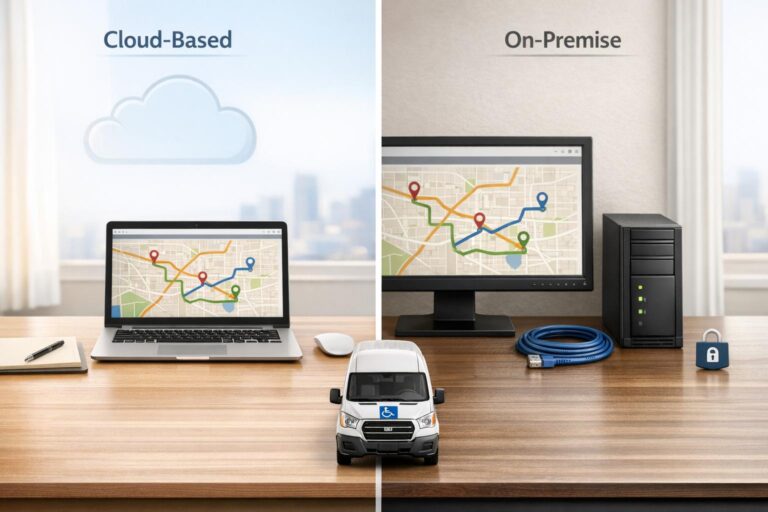
Choosing between cloud-based and on-premise NEMT software comes down to your fleet size, budget, IT resources, and operational needs. Here’s the key difference: cloud-based software is hosted online, managed by the vendor, and offers subscription pricing, while on-premise software is installed on your own servers, requiring higher upfront costs and in-house IT management.
Key Takeaways:
- Cloud-Based Software: Ideal for fleets with 1–25 vehicles. Features include essential NEMT dispatch features like automatic updates, broker integrations, and easy scalability. Subscription costs range from $20–$125 per vehicle/month, with setup fees around $1,000.
- On-Premise Software: Suited for large enterprises with in-house IT teams. Offers more customization but demands significant upfront investment ($2,000–$8,000) and ongoing maintenance.
Quick Comparison:
| Feature | Cloud-Based (SaaS) | On-Premise (Installed) |
|---|---|---|
| Cost | Low upfront, subscription model | High upfront, hardware required |
| Setup Time | Days to weeks | Weeks to months |
| Updates | Automatic, vendor-managed | Manual, user-managed |
| Access | Browser or mobile app | VPN or remote desktop needed |
| Scalability | Add users/vehicles in minutes | Requires hardware upgrades |
| Best For | Small to mid-sized fleets | Large enterprises |
Cloud-based platforms are often the better choice for small-to-medium NEMT providers due to their flexibility and lower maintenance burden. This transition is often the first step for providers moving away from manual dispatching. However, on-premise systems may work better for larger organizations needing extensive customization or offline capabilities.
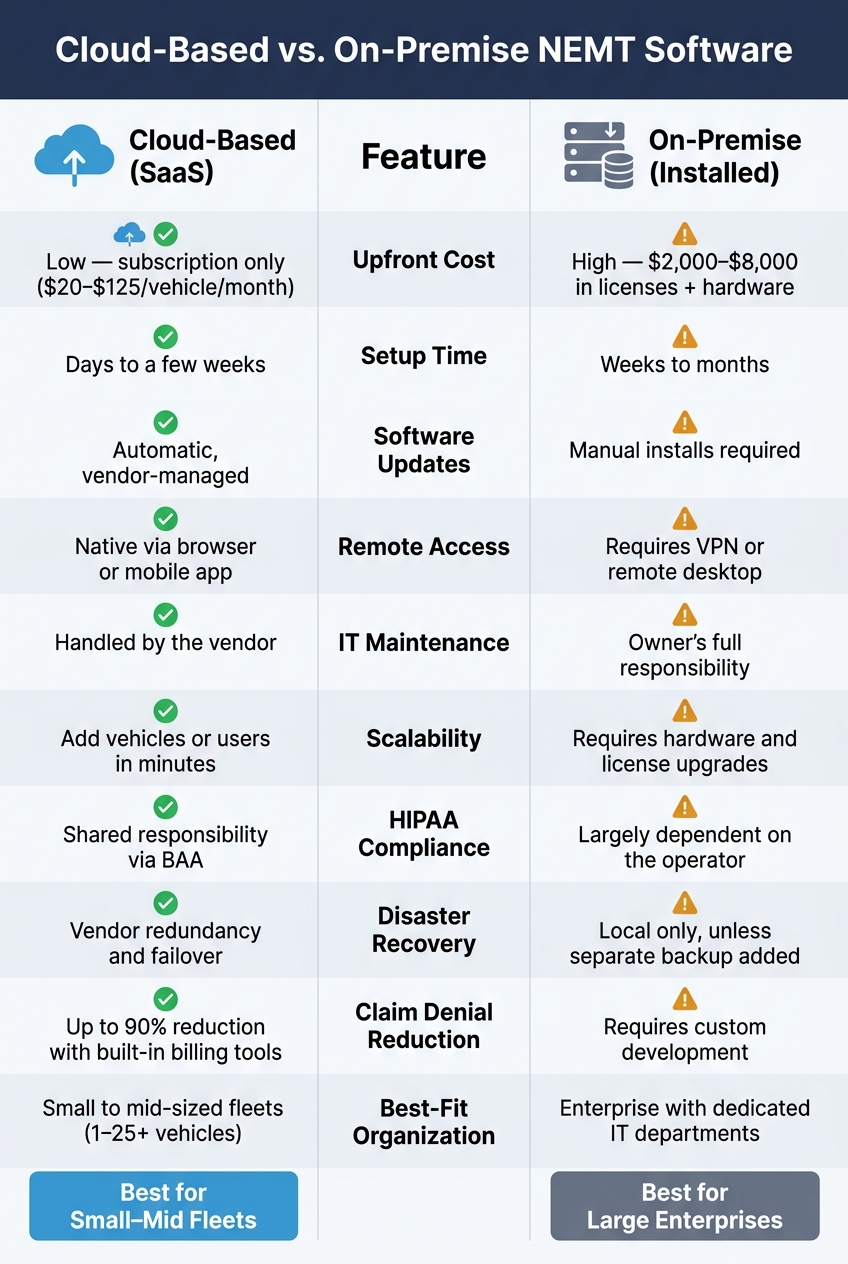
Cloud-Based vs. On-Premise NEMT Software: Full Comparison
Cloud vs. On-Premise Software: Which is Better?
sbb-itb-af83355
Cloud-Based NEMT Software: Features, Benefits, and Limitations
When comparing deployment models, cloud-based platforms stand out for their technical capabilities and ease of operation.
Key Features of Cloud-Based NEMT Software
Cloud-based NEMT software integrates scheduling, dispatch, billing, and compliance into a single platform. These systems often include real-time scheduling dashboards that let dispatchers handle last-minute changes from any browser. Automated route optimization helps sequence stops efficiently, considering factors like appointment times, vehicle type (e.g., wheelchair-accessible or standard), and shared-ride opportunities. This reduces unnecessary mileage and improves efficiency. Drivers can update trip statuses through a mobile app, which also provides turn-by-turn navigation and digital manifests, eliminating the need for paper logs or group texts. This setup simplifies daily tasks for both office and field teams.
Another standout feature is the ability to generate EDI 837P and CMS-1500 claims directly from trip data. Integrated billing tools help reduce claim denials by up to 90%. Connections to broker networks like Modivcare, MTM, and Veyo are built-in, so there’s no need for manual data entry into portals. Additionally, the system sends automatic alerts for expiring driver licenses, CPR certifications, and vehicle inspections. These features create a solid foundation for the operational advantages discussed next.
Operational Benefits and Scalability
For smaller fleets, cloud-based platforms offer quick deployment – often up and running within 24 hours of signing up, compared to the weeks or months required for traditional on-premise systems. Scaling is equally straightforward: adding vehicles or dispatchers takes just minutes and comes with a predictable subscription cost. This flexibility makes cloud solutions particularly well-suited for fleets ranging from 1 to 25 vehicles.
Security and Cost Breakdown
Cloud-based systems prioritize security while maintaining a clear and predictable cost structure. They maintain HIPAA compliance in NEMT operations by implementing safeguards like encryption, multi-factor authentication (MFA), role-based access controls, and automated audit logs. Vendors also manage user access and must be willing to sign a Business Associate Agreement (BAA), as required by HIPAA.
“Cloud service providers can have HIPAA obligations when they create, receive, maintain, or transmit ePHI for covered entities or business associates.” – U.S. Department of Health and Human Services
Pricing for these platforms typically follows a subscription model, with mid-market plans ranging from $20 to $95 per vehicle per month. However, first-year costs may include setup fees – often $1,000 or more – for broker integrations and onboarding.
Limitations of Cloud-Based Solutions
The main drawback of cloud-based software is its dependence on a stable internet connection. If connectivity is lost, dispatchers may be unable to access dashboards, and drivers could experience temporary disruptions – especially in areas like hospital parking garages with weak signals. While many platforms offer offline modes that sync data once the connection is restored, providers in rural areas with spotty broadband should test this feature thoroughly before committing.
Additionally, large healthcare systems with heavily customized legacy software may find that standard cloud-based configurations don’t always align with their specific workflows, which could pose challenges during implementation.
On-Premise NEMT Software: Features, Benefits, and Limitations
What On-Premise NEMT Software Is and Who Uses It
On-premise NEMT software is installed directly onto a local server rather than being hosted on a vendor’s infrastructure. This setup means all resources and data are managed internally.
This type of software is generally not suited for small or mid-sized fleets. Instead, it’s typically used by large hospital systems, public transit agencies, and enterprise-level NEMT operations. These organizations often need to integrate transportation scheduling with existing legacy clinical systems or operate in areas where internet access is inconsistent or unreliable. Unlike cloud-based solutions, this model offers distinct advantages in customization and operational control.
Customization, Security, and System Integration
One of the standout features of on-premise systems is the ability to deeply customize them. They can handle tasks like complex Medicaid billing, multi-clinic routing, and direct integration with Electronic Health Records (EHR) using frameworks like HL7 or FHIR. However, this level of control also places full responsibility for HIPAA compliance on the operator. This is a key difference from cloud-based systems, which typically include automated security updates as part of the service.
Remote access to on-premise systems can be tricky. Users often need to set up a VPN or use remote desktop configurations to access the software from outside the office. This adds another layer of complexity, which also ties into the higher costs associated with these systems.
Cost and Scalability Challenges
The cost structure for on-premise software is quite different from cloud-based solutions. Instead of paying a recurring monthly subscription, operators face significant upfront expenses for licenses, hardware, and installation. For mid-to-large fleet platforms, these costs can range from $2,000 to $8,000, depending on the provider. Deployment can also take weeks or even months to complete.
Ongoing expenses include IT support fees, manual updates, and hardware upkeep. Scaling up is another challenge – adding capacity often requires purchasing new hardware and additional user licenses, unlike cloud-based systems where you can simply adjust your subscription plan.
Another significant risk is the reliance on a single point of failure. If the local server hosting the software goes down, dispatch operations can grind to a halt until repairs or replacements are made.
“For NEMT, this often shows up as an older system tied to a single office PC, where the dispatcher has to be physically at that machine to make changes. If the computer crashes, dispatch stalls.” – Elite Route Dispatch
For organizations without a strong IT team or a reliable disaster recovery plan, this vulnerability can be a compelling reason to explore alternative solutions.
Cloud-Based vs. On-Premise NEMT Software: Side-by-Side Comparison
Comparison Table: Key Differences at a Glance
This table breaks down the main differences between cloud-based and on-premise NEMT software, focusing on areas like cost, scalability, and ongoing IT responsibilities. These distinctions impact everything from how quickly drivers can be onboarded to how security updates are managed.
| Dimension | Cloud-Based (SaaS) | On-Premise (Installed) |
|---|---|---|
| Upfront Cost | Low – subscription only | High – licenses plus server hardware |
| Implementation Time | Days to a few weeks | Weeks to months |
| Software Updates | Automatic, vendor-managed | Manual installs required |
| Remote Access | Native via browser or mobile app | Requires VPN or remote desktop |
| IT Maintenance | Handled by the vendor | Owner’s full responsibility |
| Scalability | Add vehicles or users in minutes | Requires hardware and license upgrades |
| HIPAA Compliance | Shared responsibility via a BAA | Largely dependent on the operator |
| Disaster Recovery | Vendor redundancy and failover | Local only, unless a separate backup is added |
| Best-Fit Organization | Small to mid-sized fleets (1–25+ vehicles) | Enterprise with dedicated IT departments |
For day-to-day operations, these differences can significantly influence efficiency and cost-effectiveness. For instance, cloud-based platforms like NEMT Cloud Dispatching, starting at $49.99/month, allow operators to avoid the upfront hardware expenses tied to on-premise systems.
How These Models Work in Practice
The real-world impact of these systems becomes clear when looking at how they handle daily NEMT tasks. Cloud-based platforms, such as RouteGenie and NEMT Cloud Dispatching, often come equipped with EDI (Electronic Data Interchange) capabilities. This feature allows them to automatically process trip assignments from major brokers like Modivcare and MTM, eliminating the need for manual data entry. By automating these processes, cloud platforms help dispatchers reduce billing errors and save time – both of which are critical for managing high trip volumes.
“The cheapest platform that misses 8% of broker billing costs more than the most expensive one that catches it.” – NEMTInsurance.com
On the other hand, on-premise systems typically lack built-in broker connectivity. To achieve similar functionality, operators often need to invest in custom development and ongoing IT support, which can add to the overall cost over time.
Take Modivcare as an example. As a large-scale national broker, it operates with a robust infrastructure designed for high-volume networks. Providers are often required to meet specific EDI standards to efficiently receive and process trip assignments. Cloud-based platforms, with their native broker integration, make meeting these standards more straightforward compared to on-premise systems, which may require additional middleware.
From a practical standpoint, cloud-based dispatchers offer unmatched flexibility. They allow dispatchers to reroute drivers, update trip statuses, and reconcile billing claims from any device with internet access. In contrast, on-premise systems typically require a VPN or office-based setup for similar tasks. For growing fleets that prioritize adaptability, this accessibility can make a huge difference in daily operations.
How to Choose the Right NEMT Software Model
Key Factors to Consider Before Deciding
When deciding on the ideal NEMT software model, it’s crucial to weigh features and costs against your operational needs. One of the biggest factors is cost. Cloud-based platforms operate on a monthly subscription model (OpEx), while on-premise systems require a significant upfront investment for hardware and licenses (CapEx). If your organization lacks dedicated IT staff, managing local servers and handling manual updates for on-premise systems can quickly become overwhelming.
Another critical factor is HIPAA compliance, which is essential in the NEMT industry. With cloud-based software, the vendor typically shares compliance responsibilities, but you’ll need to ensure they sign a Business Associate Agreement (BAA). On the other hand, on-premise solutions place the entire compliance burden on your team.
It’s also important to budget for the first year of implementation. The initial costs, including setup, training, and broker connection fees, can amount to roughly three times the annual subscription cost. Planning for these expenses ahead of time can help avoid financial surprises.
These considerations around cost and IT resources should also be evaluated alongside your geographic operations and future growth plans.
Rural vs. Urban Operations and Growth Planning
Geography plays a big role in determining which deployment model is best for your business. Urban markets often benefit from cloud platforms because of features like real-time GPS tracking, instant rerouting, and mobile driver apps – tools that brokers increasingly expect from providers. However, in rural areas, inconsistent cellular or broadband coverage can disrupt a cloud-only setup, potentially jeopardizing dispatch operations. If you’re in a rural location, it’s smart to audit local connectivity before committing to a cloud-based model. A hybrid approach, where cloud systems handle billing and broker communication while local systems manage dispatching, can offer a more reliable solution for these areas.
When it comes to scaling your operations, cloud platforms make it easier to grow. Adding vehicles or users can be done in minutes, while on-premise systems require additional hardware and licenses, which can be both time-consuming and costly. If you anticipate expanding your fleet in the next 12 to 24 months, this flexibility could be a deciding factor.
Finally, smooth integration with brokers and Medicaid systems is vital for maintaining consistent revenue flow.
Broker and Medicaid System Compatibility
Your platform’s compatibility with brokers and Medicaid systems has a direct impact on your bottom line. The majority of NEMT trips are assigned through broker portals or EDI feeds from companies like Modivcare, MTM, and Veyo. Manually re-entering these assignments is not only time-consuming but also a leading cause of billing errors and claim denials.
“Margins live and die on claim denials and on-time performance, so the NEMT tech stack centers on a dispatch/routing platform, broker EDI connectivity, and a billing engine with proof-of-pickup capture.” – Pulse Tech Stacks
To avoid these issues, identify your top three brokers and confirm that the software offers pre-built EDI integration for them. While setup fees for broker and clearinghouse connections average around $100 each, these costs are manageable if the integrations work seamlessly.
Another factor to consider is Electronic Visit Verification (EVV), which is now required in many states for Medicaid reimbursement. EVV mandates typically involve GPS-verified timestamps and electronic signatures. Cloud platforms with built-in mobile apps are often better equipped to meet these requirements without needing additional middleware or custom solutions.
Conclusion: Which NEMT Software Model Fits Your Operation?
For small- to medium-sized NEMT operators in the U.S., cloud-based software often makes the most sense. It eliminates the need for expensive servers, cuts down on IT-related expenses, and can be up and running much faster than on-premise systems.
That said, on-premise software still has its place. It’s a better fit for larger enterprises with dedicated IT teams, specific offline requirements, or heavily customized legacy systems.
The financial impact of your choice can’t be overstated. As highlighted by NEMTInsurance.com:
“The cheapest platform that misses 8% of broker billing costs more than the most expensive one that catches it.” – NEMTInsurance.com
So, while cost is a factor, it’s not the only one. Features like broker EDI integration, billing accuracy, and EVV compliance – discussed earlier – can have a much bigger influence on your profitability than the monthly subscription fee. For example, platforms with built-in claim scrubbing and automated 837P generation can cut denial rates by as much as 90%, helping you protect Medicaid trip margins, which typically range from $25 to $60.
FAQs
What’s the real total cost in year 1 for cloud vs. on-premise?
When you look at the monthly subscription fee for NEMT software, it might seem manageable. However, it usually accounts for just about 30% of the true first-year cost.
Cloud-based solutions tend to have lower initial costs, but on-premise systems come with added expenses like hardware purchases and ongoing manual maintenance. The year-one expenses can stack up quickly. These often include setup fees, broker integrations (ranging from $100 to $1,500 per connection), staff training, data migration, and even temporary costs for running dual systems during the transition.
Industry experts recommend planning for a budget that’s three times the annual subscription fee to cover the complete implementation process.
How do I handle dispatching if internet or cellular service drops?
If internet or cellular service goes down, dispatching can quickly become a hassle since most cloud-based NEMT software depends on connectivity for real-time updates. To stay prepared, opt for platforms that offer offline functionality. These systems let drivers log key details like timestamps, signatures, and odometer readings, which will sync automatically once the connection is restored.
On the other hand, on-premise systems eliminate internet dependency but come with their own risks, such as potential hardware failures. A middle-ground option, like RouteGenie, blends the dependability of offline data caching with compliance for EVV requirements, offering a balanced approach.
What should I ask a vendor to confirm HIPAA and BAA coverage?
To ensure HIPAA compliance and proper Business Associate Agreement (BAA) coverage, start by asking the vendor if they’re willing to sign a formal BAA, as required under HIPAA regulations. You should also request documentation verifying that their platform’s architecture adheres to HIPAA standards, especially regarding data storage and transmission.
Additionally, dig into their security practices. Ask how they handle security updates, implement data encryption, and maintain audit logs. These measures are crucial for keeping protected health information (PHI) secure and meeting regulatory requirements.