If an NEMT vendor can’t show a signed BAA, MFA, encryption, audit logs, backups, mobile controls, and staff/security process documents, I’d stop the review.
This article makes one point fast: HIPAA-safe NEMT software is not just about NEMT dispatch features. It’s about whether rider data stays protected across scheduling, driver apps, GPS tracking, billing, and claims.
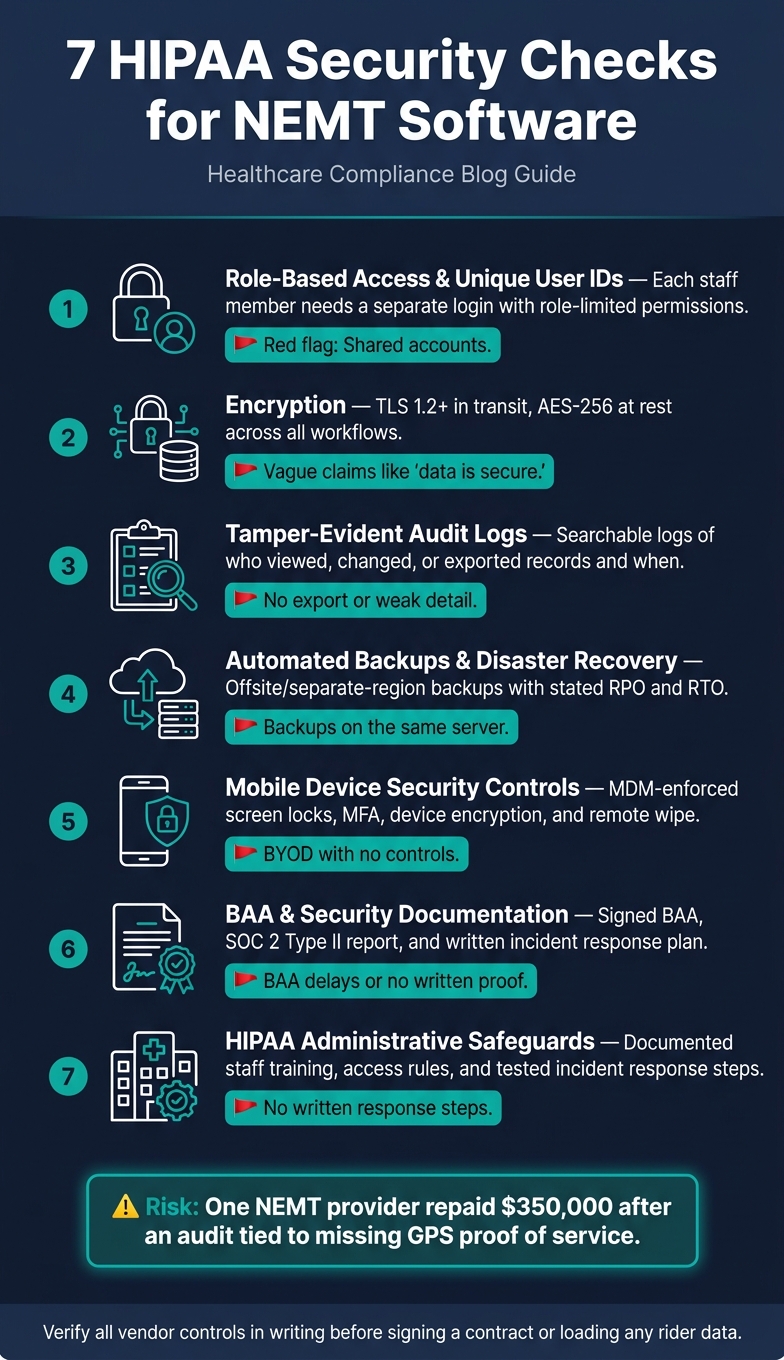
Here’s what I’d check before I put any rider data into a platform:
- Access controls: each staff member needs their own login, with role limits
- Encryption: data should use TLS 1.2+ in transit and AES-256 at rest
- Audit logs: the system should log who viewed, changed, or exported records
- Backups and recovery: vendors should state backup frequency, restore time, and failover process
- Mobile security: driver phones and tablets should support screen locks, MFA, encryption, and remote wipe
- Contracts and proof: the vendor should sign a BAA and provide security reports like SOC 2 Type II
- Admin safeguards: staff training, access rules, and incident response steps should be written down
A missing control can cost money, time, and contracts. The article even points to a case where an NEMT provider repaid $350,000 after an audit tied to missing GPS proof of service.
7 HIPAA Security Checks for NEMT Software
Quick Comparison
| Check | What I’d look for | Fast red flag |
|---|---|---|
| Access | Separate logins and role-based permissions | Shared accounts |
| Encryption | TLS 1.2+ and AES-256 | Vague claims like “data is secure” |
| Audit logs | Searchable trip and user activity history | No export or weak detail |
| Backups | Offsite or separate-region backups with stated RPO/RTO | Backups on the same server (common in cloud-based vs. on-premise NEMT software comparisons) |
| Mobile | MFA, screen lock, remote wipe, device encryption | BYOD with no control |
| BAA & proof | Signed BAA, SOC 2 Type II, incident plan | BAA delays or no written proof |
| Safeguards | Staff training and access/offboarding process | No written response steps |
Bottom line: I’d treat this as a security checklist, not a feature checklist.
sbb-itb-af83355
Key Terms to Know Before Reviewing NEMT Software
These terms shape every vendor review. Use them to judge each vendor’s controls, contracts, and safeguards. They line up with the seven checks below.
PHI and ePHI
PHI (Protected Health Information) is health information that can be tied to a specific person. It covers details about someone’s health, care, or payment for care. In NEMT, that might mean a rider’s name, pickup address, and appointment time.
ePHI is PHI that is created, stored, sent, or received electronically – like data inside dispatch software, mobile apps, or digital billing files. Once rider, trip, or billing data moves through those systems, it becomes ePHI.
| Data Category | Common ePHI Examples |
|---|---|
| Rider Identity | Full name, phone number, home address |
| Medical Context | Appointment type, facility name, mobility aids, medical notes |
| Trip Records | Pickup/drop-off timestamps, GPS logs, electronic signatures |
| Billing Info | Medicaid ID numbers, 837P/CMS 1500 files, insurance claim status |
Business Associate and BAA
If a vendor stores or handles rider data, it is a Business Associate under HIPAA.
A Business Associate Agreement (BAA) is the contract that sets that relationship in writing. It says the vendor must protect ePHI under HIPAA rules. Put simply: don’t load rider data into a new platform until the BAA is signed.
Audit Logs, MFA, and Encryption
You’ll hear these three terms in almost every security demo, and for good reason.
Encryption turns data into unreadable text unless someone has the right digital key. Two types matter here:
- In transit: protects data as it moves between a driver’s app and the server, using TLS 1.2 or higher
- At rest: protects stored data using AES-256
When you review a vendor, ask for both standards by name.
Multi-factor authentication (MFA) adds a second check after the password – often a temporary code sent to a mobile device. It’s one of the best ways to block unauthorized access, especially when a driver tablet goes missing.
Audit logs are a tamper-evident record of system activity: who opened a rider’s record, who changed a trip time, and when it happened. If an audit happens later, those logs show what changed, who did it, and when.
With these terms in mind, the next check is who can access rider data and what each user can do.
1. Role-Based User Access and Unique User IDs
Shared logins are a mess for accountability. If multiple people use the same account, you can’t tell who changed a trip, updated billing, or exported data. That gap matters. With unique user IDs, admins can tie each action to one person and cut off access at once when someone leaves or moves into a new role.
HIPAA Security Rule Alignment
The HIPAA Security Rule expects every person who accesses ePHI to have a unique user ID. That way, admins can trace each action back to one account. On top of that, role-based access control, or RBAC, limits what each user can view or change based on their job. That lines up with the principle of least privilege.
NEMT Workflow Coverage
In a typical NEMT software workflow, different teams need different access.
- Dispatchers need trip visibility
- Drivers need manifest updates through a mobile app
- Billing staff need access to generate 837P or CMS 1500 forms
Keeping those roles separate with RBAC is a core part of staying HIPAA compliant in NEMT operations and cuts down on data exposure across the workflow. Put simply, a driver shouldn’t see the same things as someone in billing, and billing doesn’t need the same access as dispatch.
Vendor Documentation Proof
When you’re checking a vendor, ask for recent third-party security documentation that shows how access controls are tested. Look for proof that the platform enforces role-based permissions and blocks unauthorized access.
Access control decides who can get to ePHI. The next step is making sure that data stays protected if traffic is intercepted or a device is compromised.
2. Encryption for Data in Transit and at Rest
Once access control limits who gets in, encryption protects data while it moves and while it sits in storage.
HIPAA Security Rule Alignment
Under the HIPAA Security Rule, encryption is a key technical safeguard for ePHI. Ask vendors to support TLS 1.2 or higher for data in transit and AES-256 for data at rest.
NEMT Workflow Coverage
Encryption should cover the whole NEMT workflow, not just the main portal. That includes:
- Dashboards
- Driver apps
- API imports
- Messaging
- Claims traffic
That last part matters. A vendor can say data is encrypted, but you still need proof that coverage extends across the places where data actually flows.
Vendor Documentation Proof
Controls on paper don’t mean much without evidence. Ask for SOC 2 Type II documentation and review any exceptions. ISO/IEC 27001 certification is another good sign that the vendor manages information security in a structured way.
Operational Risk Reduction
Encryption can cut audit and breach exposure. But it won’t stop phishing, stolen passwords, or an unlocked phone left in a car. That’s why the next checks focus on MFA, audit logs, and mobile device controls.
3. Tamper-Evident Audit Logs
HIPAA Security Rule Alignment
HIPAA requires audit logs that record access to and changes in ePHI. Those logs also need to be tamper-evident. In plain terms, the system should keep a clear record of who accessed, changed, or exported ePHI, and when that happened.
Once access is locked down and data is encrypted, the next step is simple: see who touched the record. If someone edits a trip record, runs a PHI export, or resets a password, the system should log who did it, when it happened, and which user account or device was involved.
NEMT Workflow Coverage
A good audit log needs to track more than sign-ins. It should cover the day-to-day actions that matter in NEMT:
| Action Category | What Gets Logged |
|---|---|
| Trip Management | Edits to pickup/drop-off times, cancellations, reassignments |
| User Access | Logins, MFA successes/failures, permission changes |
| Data Handling | PHI exports, report generation, API syncs with brokers like Modivcare or MTM |
| Field Compliance | GPS pings, e-signatures |
That kind of coverage is a good start, but it doesn’t prove much by itself. The vendor should be able to show that the logging works when you need it.
If the system can’t pull up a specific record fast, the audit trail is too weak to trust.
Vendor Documentation Proof
Ask for the vendor’s SOC 2 Type II report under NDA. Type II is the one that matters here because it checks whether logging controls work over time, not just whether they exist on paper.
During a demo, ask them to pull the log for a disputed trip. You should be able to see a searchable record with the user ID, timestamp, and device or location. If they can’t show that, you’ve found a gap.
Also ask for the SOC 2 Type II report under NDA, then verify log export and retention rules. Log retention should line up with HIPAA and state retention rules.
These logs matter only if they still exist after device loss, outages, or account compromise.
4. Automated Backups and Disaster Recovery
Backups are the recovery check after access control, encryption, and logging.
HIPAA Security Rule Alignment
HIPAA’s Security Rule requires covered entities and business associates to keep a data backup plan and a disaster recovery plan as part of a broader contingency strategy. The point is straightforward: if a system goes down, ePHI still needs to be recoverable.
NEMT Workflow Coverage
For NEMT operators, trip records, rider data, GPS logs, and claim files need to stay recoverable after any failure. That means backups should be stored offsite in a separate region, including U.S.-based data centers for U.S. operations.
Vendor Documentation Proof
During a demo, ask two direct questions: "How often is our data backed up?" and "How long to restore?" Those answers help define the vendor’s Recovery Point Objective (RPO) and Recovery Time Objective (RTO).
If a vendor can’t answer both in plain English, that’s a red flag. It often means the recovery process hasn’t been tested under pressure.
Use this part of the vendor review for RPO/RTO and recovery testing only. SOC 2 Type II verification of backup controls is covered in the audit-log check above.
Operational Risk Reduction
Ask whether failover is automatic or manual.
The table below shows what different vendor tiers should offer:
| Support Level | Backup & Recovery Expectations | Best For |
|---|---|---|
| Premium / 24/7 | Automated, high-frequency backups with near-instant failover and <30 min response | High-volume fleets, emergency transport |
| Standard Business | Daily automated backups with documented RTO/RPO and 2–4 hour response | Small to mid-sized fleets |
| Basic / Self-Service | Standard daily backups; recovery may require manual intervention or longer wait times | Startups or very small fleets |
Recovery matters most when field devices fail or a vendor outage cuts into live operations.
5. Mobile Device Security Controls
Even a solid recovery plan can fall apart if a driver’s device gets exposed first.
Phones and tablets used by drivers are one of the biggest ePHI risk points. They move from vehicle to vehicle, connect to public Wi‑Fi, and are often personally owned. That means mobile security is a direct ePHI control, not just an IT box to check.
HIPAA Security Rule Alignment
Set up MDM controls for screen locks, device encryption, remote wipe, and required MFA. Data sent in transit should use TLS 1.2+ to cut interception risk on public networks.
NEMT Workflow Coverage
Drivers rely on mobile apps for manifests, signatures, and GPS proof of service. Those apps should keep ePHI out of device storage and out of the phone’s photo gallery.
For BYOD, selective wipe should remove business data without touching personal files.
Vendor Documentation Proof
During a demo, ask the vendor to show:
- Remote wipe
- Login lockouts after failed attempts
- Passcode requirements
- Any VPN or secure Wi‑Fi rules for personal devices
If the vendor and operator split security duties, spell out who handles device lockout, wipe, and breach response.
Operational Risk Reduction
Use these controls to separate basic app security from mobile management that lines up with HIPAA.
| Security Feature | Basic Implementation | HIPAA-Aligned Implementation |
|---|---|---|
| Screen Lock Enforcement | User-configured, not enforced | MDM-enforced, required at login |
| Remote Wipe | Manual request to vendor | Operator-triggered |
| BYOD Data Separation | Not supported | Selective wipe via MDM |
| Wi-Fi Protection | No specific network requirement | TLS 1.2+ enforced in transit |
| MFA for Drivers | Optional | Mandatory for all users |
A stolen phone shouldn’t turn into a HIPAA incident.
6. Vendor Support, BAAs, and Security Documentation
A BAA is required when a vendor handles ePHI for your operation. And that BAA needs to line up with the workflows that actually touch rider data: trip intake, scheduling, dispatching, driver communication through mobile apps, and billing or claims processing.
HIPAA Security Rule Alignment
Ask for a SOC 2 Type II report or ISO/IEC 27001 certification too. A SOC 2 Type II report looks at security controls over time, not just on one day. That matters.
Request the report under NDA, then review the auditor’s opinion for any exceptions. A verbal claim of compliance isn’t enough.
NEMT Workflow Coverage
The paperwork should match the way rider data moves through the system. Confirm that the vendor can support GPS-verified proof of service and electronic signatures across dispatch, driver apps, and claims.
And here’s the key part: those workflows should show up in the vendor’s written controls, not just in a polished demo. A demo can look great. The documents tell you what the vendor is actually willing to stand behind.
Vendor Documentation Proof
The vendor’s written controls should match the NEMT workflows listed above. During a demo or vendor review, ask for:
- The signed BAA
- SOC 2 Type II report or ISO/IEC 27001 certification
- Incident response plan – specifically who to contact, how systems are isolated, and how clients are notified
- Uptime SLA – industry-standard SLAs for cloud dispatch software typically guarantee 99.9% uptime
- Escalation path for outages and breach notices
Operational Risk Reduction
Documentation matters most when something goes wrong and your team has to move fast. That’s when vague promises fall apart.
Support is part of security. NEMT runs in the early morning, late at night, and everywhere in between. If a vendor only offers business-hours support, that can leave providers exposed at the worst possible time.
When dispatch, mobile access, or billing goes down, support becomes a security control. Common support tiers usually look like this:
| Support Level | Availability | Response Time | Best For |
|---|---|---|---|
| 24/7 | 24/7/365 | < 30 minutes (phone/chat) | High-volume fleets |
| Business Hours | Mon–Fri, 8 AM–5 PM | 2–4 hours | Small to mid-sized fleets |
| Self-Service | Business hours | 24 hours | Startups, very small fleets |
If a vendor can’t provide a BAA, a SOC 2 Type II report, or a written incident response plan, then you don’t have proof of basic controls.
7. HIPAA Administrative and Technical Safeguards
After contracts and support, look at how the platform handles day-to-day workforce controls.
Software by itself does not make an NEMT platform HIPAA-safe. The rule also depends on staff training, access rules, and incident response. Once access controls, encryption, logs, backups, and mobile protections are in place, the next step is to check how people are trained to use them.
HIPAA Security Rule Alignment
For technical controls, use the earlier checks for encryption and MFA. This section is about the administrative side: documented workforce training, formal access management procedures, and a tested incident response plan.
NEMT Workflow Coverage
Policies need to fit actual job roles. Vendor onboarding should be role-based so dispatchers, drivers, and billing staff understand what they can and cannot access.
A shared-responsibility model works best here: the vendor secures the platform, while your team manages users, devices, and policy enforcement.
Vendor Documentation Proof
Ask for training records and the incident response plan. You should also ask for a plain response plan that covers ransomware, new vulnerability response, system isolation, and client notice.
Those documents should line up with how your team is actually trained and how incidents are handled in practice.
Operational Risk Reduction
It also helps to ask whether the platform tracks expiring licenses, inspections, and training certifications.
What to Ask During a Software Demo or Vendor Review
A demo is your best shot to test a vendor’s security claims before you sign anything. Instead of sitting through a polished walkthrough, use the seven checks above as your live script.
Questions About Access, Encryption, and Logging
Start with access controls. Ask if unique user IDs and role-based permissions are included in the base price, or if you need a higher-tier plan to get them. Then verify whether MFA can be required for every user role – dispatchers, drivers, and admins – instead of being left optional.
Next, move to encryption. Confirm the platform uses AES-256 at rest and TLS 1.2 or higher in transit. After that, ask if you can pull a full audit log for any trip record and whether those logs are tamper-evident.
If a vendor gets vague or stalls on these points, that’s a bad sign. It usually means the rest of the review needs a much closer look.
Questions About Backups, Mobile Security, and Data Storage
Ask how often backups run, whether they’re kept in a separate region, and what recovery looks like after an outage. You should also ask where your data is hosted and whether those storage locations fit your compliance needs.
For mobile security, verify that the driver app supports MDM controls like remote wipe. Also ask whether screen locks and device encryption are enforced on BYOD devices. If you ever need to leave, get the exact process for exporting your data. Don’t settle for a vague promise like "we can help with that."
Questions About BAAs, Support, and Incident Response
Make sure the vendor will sign a BAA on your current plan. Some hold that back for enterprise tiers only. Ask for a SOC 2 Type II report too.
Then get practical. Ask what happens if the system goes down before your first run. Request the vendor’s written incident response plan, including breach notification, system isolation, and patch timelines.
A short scorecard can make these calls much easier to compare:
| Question Area | What to Ask | Why It Matters |
|---|---|---|
| MFA & Access | "Is MFA mandatory for all user roles at this price?" | Supports least-privilege access |
| Encryption | "Do you use AES-256 at rest and TLS 1.2+ in transit?" | Confirms baseline data protection standards |
| Audit Logs | "Can I pull a full audit log for any trip record?" | Helps track changes for compliance reviews |
| Backups | "Are backups stored in a separate region?" | Supports recovery after outages or disasters |
| BAA | "Will you sign a BAA on this plan?" | Confirms the vendor can support HIPAA-covered workflows |
| Incident Response | "What’s your breach notification timeline?" | Clarifies how the vendor handles outages and breaches |
Comparison Tables to Help You Evaluate Vendors
These demo answers make vendor scoring a lot easier. Instead of digging through broad security claims, you can use the tables below as a fast screen to spot where one vendor has stated a control and another can actually show how it works.
Verify current details directly with each vendor before deciding.
Access Control and Encryption Comparison
All four vendors list the basic access and encryption controls. The key thing during a demo is simple: check whether those controls are enforced by default or left up to the user.
| Differentiator | NEMT Cloud Dispatch | Bambi | Tobi Cloud | RouteGenie |
|---|---|---|---|---|
| MFA Enforcement | Mandatory | Optional | Optional | Optional |
| Session Timeout Enforcement | MDM-enforced | User-configured | User-configured | User-configured |
That gap matters. A vendor may say MFA or session timeouts are available, but available is not the same as enforced. Confirm how each vendor applies these controls in day-to-day use.
Audit Logs and Backup Comparison
| Feature | NEMT Cloud Dispatch | Bambi | NEMT Platform | TripMaster |
|---|---|---|---|---|
| Log Detail | Every action logged | GPS/timestamped | Full audit trail | Every action logged |
| Export Options | PDF, CSV, HTML | Electronic files | Real-time dashboard | PDF, CSV |
This table is mostly about two things: how much detail the logs include and how easy they are to export. Before signing, confirm the exact retention window and the export format. Small details here can turn into big problems later, especially if you need records for an audit or incident review.
Mobile Security and Vendor Documentation Comparison
| Feature | NEMT Cloud Dispatch | Bambi | NEMT Platform | RouteGenie |
|---|---|---|---|---|
| Third-party proof | HIPAA | HIPAA | SOC 2 Type II | HIPAA |
| Support Hours | 24/7 | 24/7 | 24/7 | Business hours |
Third-party proof and support coverage are the clearest points of difference here. A SOC 2 Type II report carries more weight than a general compliance statement because it checks controls over a period of time. If a vendor only says it is HIPAA compliant, ask what proof supports that claim.
Any missing item here should move a vendor to the risk list.
Red Flags That Signal Higher HIPAA Risk
The tables above set the baseline. These red flags should push a vendor off your shortlist fast.
Access and Authentication Red Flags
Shared accounts, optional MFA, and weak role separation are immediate disqualifiers. Shared logins are the clearest warning sign. If users don’t have their own IDs, you lose the audit trail. And without that trail, it’s hard to know who did what.
Optional MFA is another gap. So is weak role separation. Both make it easier for people to get access they shouldn’t have, which cuts against least privilege.
If access controls are shaky, the next issue is simple: can the platform protect the data it stores?
Data Protection and Recovery Red Flags
Vague encryption claims and backups kept in the same environment leave you with no proof of protection. If a vendor can’t name the standard, don’t accept the claim. That’s not enough.
Backups on the same server or in the same environment won’t help much during an outage or ransomware event. Backups need to be separate, recoverable, and tied to a tested recovery timeline.
Technical claims on their own don’t mean much if the contract terms and incident response steps aren’t spelled out in writing.
Vendor Accountability Red Flags
BAA delays are a stop sign. You should also watch for fuzzy data export terms and the lack of a formal incident response process. If a vendor can’t tell you how you’ll get your data back after leaving – in what format, within what timeframe, and at what cost – you’ve got a data portability issue.
And if they can’t describe a clear patching process for major vulnerabilities, that points to weak security governance.
| Red Flag | Why It Matters |
|---|---|
| Shared user accounts | No individual audit trail |
| MFA listed as "optional" | Unauthorized access risk |
| Vague encryption claims | Unverified protection |
| Backups on same server | Weak recovery |
| BAA delay or resistance | Contract risk |
| No data export process | Data exit risk |
| No incident response plan | Slow breach response |
Any one of these failures is enough to pause procurement.
Conclusion
Once you get past the red flags, it comes down to one thing: proof.
Marketing promises aren’t enough. You need written proof that a platform can protect ePHI. The seven checks in this guide – role-based access, encryption, audit logs, backups, mobile device controls, BAAs and security documentation, and HIPAA safeguards – help you see whether that protection works in day-to-day use.
The risk isn’t abstract. One NEMT provider repaid $350,000 after an audit found it could not verify GPS proof of delivery. A gap in documentation can turn into a compliance problem and a direct financial hit.
If a platform such as NEMT Cloud Dispatch matches your workflow, that’s only the start. It still needs to pass the same checks in writing. Use these seven checks before you book a demo, sign a contract, or move any rider data.
Choose the platform that can prove its controls on paper.
FAQs
What makes NEMT software HIPAA-safe?
HIPAA-safe NEMT software needs both technical controls and admin controls. It’s not enough to lock the front door if the side door is still open.
Key protections should include AES-256 encryption for stored data, TLS 1.2+ for data in transit, role-based access control, and multi-factor authentication.
The software should also keep detailed audit logs. On top of that, it should support compliance through signed Business Associate Agreements and third-party certifications such as SOC 2 Type II.
Who is responsible for HIPAA compliance – the vendor or my team?
HIPAA compliance is a shared responsibility.
Your software vendor handles cloud security and gives you tools that support HIPAA. Your team, on the other hand, is responsible for what happens inside your day-to-day operation.
That means setting up security controls the right way, deciding who gets access, and making sure company devices stay secure. Cloud-based NEMT software can help a lot, but software by itself doesn’t make you compliant.
What documents should I ask for before signing?
Before you sign, ask the vendor for documents that show how they handle security, compliance, and day-to-day operations. At a minimum, request:
- a signed Business Associate Agreement (BAA)
- their SOC 2 Type II report
- a documented data export process
- a formal Service Level Agreement (SLA)
- proof of vulnerability management and patching procedures
You should also review documentation for audit logging and role-based access controls.
This step matters for a simple reason: sales claims are easy to make, but written proof gives you something concrete to review. It also helps your legal, IT, and compliance teams spot gaps before they turn into problems.