
Running a Non-Emergency Medical Transportation (NEMT) service is complex. To stay profitable, you need software that simplifies operations, reduces errors, and ensures compliance with Medicaid and broker requirements. Here’s what to look for:
- Real-Time GPS Tracking: Monitor vehicles live to improve on-time performance and reduce fuel costs.
- Automated Scheduling & Route Optimization: Avoid manual errors, cut deadhead miles, and increase trip efficiency.
- Mobile Driver Apps: Streamline communication with features like navigation, real-time updates, and electronic documentation.
- HIPAA-Compliant Data Security: Protect patient data with encryption, access controls, and breach safeguards.
- Integrated Billing Tools: Reduce claim denials with automated Medicaid and insurer documentation.
- Compliance Features: Meet CMS, Medicaid, and broker standards with automated eligibility checks and audit trails.
- Fleet Management: Simplify vehicle assignments and track maintenance to avoid compliance issues.
- Cloud-Based Systems: Access operations anywhere with scalable, low-maintenance solutions.
- Third-Party Integrations: Sync with brokers, EHRs, and other systems to avoid manual data entry.
- Analytics & Dashboards: Use performance data to reduce no-shows, improve efficiency, and boost revenue.
The right software can cut claim denials by up to 90% and simplify daily operations. Whether you’re managing a small or large fleet, prioritize these features to ensure smooth, compliant, and efficient NEMT operations.
NEMT Software Features – NEMT Cloud Dispatching
sbb-itb-af83355
1. Real-Time GPS Tracking and Live Map Views
For dispatchers juggling multiple vehicles, real-time GPS tracking provides clarity and control. Instead of relying on manual dispatch, dispatchers can monitor every vehicle on a live map, making it easier to act quickly – whether it’s rerouting around a traffic jam or assigning the nearest driver to a new trip.
This technology improves on-time performance by 20%, allowing for quick adjustments that lead to better patient experiences. Plus, fewer deadhead miles mean reduced fuel expenses and more efficient scheduling. These are essential NEMT fleet management strategies for maintaining healthy margins.
“Real-time access to vehicle locations transforms dispatching from a reactive process to a proactive one, allowing for immediate adjustments that keep operations running smoothly.” – Elite Route Dispatch
Accurate timestamps and route records also simplify Medicaid and broker compliance, cutting down on manual paperwork and minimizing errors that could result in claim denials. By integrating with advanced scheduling tools, GPS tracking not only streamlines dispatch but also ensures smoother, more reliable NEMT operations.
2. Trip Scheduling, Auto-Dispatch, and Route Optimization
Automated dispatch systems are transforming how Non-Emergency Medical Transportation (NEMT) services operate. Relying on manual scheduling methods – like spreadsheets and phone calls – often leads to mistakes. A single scheduling error, such as assigning the wrong driver or missing an appointment window, can disrupt an entire day’s operations. Auto-dispatch systems tackle this problem by automatically pairing trips with available drivers based on factors like location, vehicle type, and patient mobility needs. This automation helps streamline operations and reduce inefficiencies.
Route optimization plays a huge role in improving fleet performance. By cutting deadhead miles by 8% and increasing the daily trip count from 7 to 8 per vehicle, fleets can see a noticeable boost in revenue – especially for operations where margins are tight. These systems also consider critical factors like appointment time windows and whether a patient requires a wheelchair-accessible vehicle, ensuring the right vehicle is assigned to the right trip every time.
“Effective route optimization is not just about finding the shortest path; it’s about ensuring that every trip is completed on time and documented correctly for billing.” – Pravin Uttarwar, CTO, Mindbowser
Accuracy is another major benefit. Automated scheduling significantly reduces errors in trip documentation. Providers making the switch from manual to automated systems have reported up to a 90% drop in claim denials, which translates into a lasting financial impact.
These advanced scheduling tools don’t work in isolation – they integrate seamlessly with other fleet management systems. Look for platforms that offer features like multi-stop and multi-load routing, real-time schedule adjustments for cancellations or delays, and automatic syncing with driver apps. Together, these capabilities ensure compliance, maintain high service standards, and distinguish basic scheduling tools from those designed to handle the specific challenges of NEMT operations.
3. Mobile Driver Apps for iOS and Android
Once trip scheduling is fine-tuned, the next hurdle is making sure drivers receive clear, instant instructions. That’s where a mobile driver app steps in, bridging the gap between dispatchers and drivers by cutting out time-wasting phone calls.
The best driver apps go beyond basic navigation. They provide turn-by-turn directions, push notifications for updates like trip changes or cancellations, and real-time two-way messaging with dispatchers – all in one place. Drivers can quickly update their status with a single tap, marking themselves as en route, arrived, picked up, or dropped off. This keeps dispatchers informed without disrupting the driver mid-route.
“With cloud-based NEMT software, dispatchers see live driver status: en route, arrived, picked up, dropped off. Drivers receive trip changes as push notifications instead of phone calls.” – Elite Route Dispatch
Mobile apps also shine when it comes to documentation. Features like GPS-stamped pickup and drop-off times, electronic signature capture, and automatic mileage logging streamline record-keeping. This real-time documentation not only ensures billing accuracy but also supports compliance efforts. For instance, one small NEMT provider using RouteGenie reduced their daily scheduling time from six hours to just 45 minutes after adopting a mobile-integrated platform that simplified trip assignments and driver communication.
When choosing a mobile driver app, make sure it works smoothly on both iOS and Android, handles offline scenarios effectively, and is intuitive enough for drivers to use without extensive training. A poorly designed app can create unnecessary roadblocks – and roadblocks mean missed trips. A well-integrated app enhances dispatch operations by ensuring timely updates and precise documentation.
4. HIPAA-Compliant Data Security and PHI Protection
After optimizing real-time dispatch and scheduling, ensuring strong data security is essential to protect patient information and maintain compliance with regulations like HIPAA.
Each trip record in your dispatch system holds Protected Health Information (PHI) – details like patient names, addresses, appointment times, and mobility requirements. This makes any data breach a serious legal and financial risk.
A HIPAA-compliant platform must include several key safeguards: data encryption (both at rest and in transit), multi-factor authentication, role-based access controls (so drivers only see their assigned trips), automatic session timeouts, and audit logs to track who accesses PHI.
“A HIPAA-aligned cloud NEMT platform should include encryption at rest and in transit, multi-factor authentication for staff logins, role-based access so drivers see only their assigned trips, automatic session timeouts, audit logs that record who did what, automated backups, and documented breach response procedures.” – Elite Route Dispatch
One critical but often overlooked element is the Business Associate Agreement (BAA). This legally binding contract ensures that your software vendor is accountable for the secure hosting and technical safeguards of patient data. If a vendor hesitates to sign a BAA, that’s a red flag.
“HIPAA places shared responsibility on both the covered entity (your NEMT business) and the business associate (the software vendor). The vendor is responsible for technical safeguards, secure hosting, and contractual protections.” – Mindbowser
It’s important to understand that compliance isn’t a one-and-done task. The U.S. Department of Health and Human Services (HHS) mandates ongoing risk assessments and breach response planning. Regular audits can lower the risk of data breaches by 30%. When choosing software, make sure to ask vendors about their breach notification protocols and how often they conduct internal security reviews. This proactive approach not only protects patient data but also simplifies Medicaid and broker claim processes.
5. Medicaid and Insurer Billing, Claims, and Documentation
Turning every trip into a paid claim is essential to avoid losing revenue. Medicaid claims have an average denial rate of 15%, and even a modest 10% denial rate can wipe out profits from trips that typically bring in between $25 and $60 each. Using integrated billing tools can help by automatically linking dispatch data to claims, reducing the chance of manual errors.
One standout feature of these tools is real-time trip documentation. GPS-verified timestamps and patient signatures are recorded during the trip and instantly connected to a billable claim. This eliminates the need for manual data entry, prevents lost paperwork, and removes guesswork. By streamlining this process, businesses not only improve documentation accuracy but can also recover thousands of dollars in revenue every month. These billing systems work hand-in-hand with compliance tools, ensuring claims are processed without interruption.
“A shorter route only matters if the completed trip becomes a documented, billable claim.” – Elite Route Dispatch
For mid-to-large fleets handling high claim volumes and navigating Medicaid’s complex rules, platforms like Tobi and NEMT dispatch software offer advanced features such as broker EDI and reconciliation capabilities. Smaller operators might prefer platforms like Bambi or NEMT Cloud Dispatching, which are more accessible but may have fewer options for broker integration.
When choosing a software solution, it’s critical to ensure the billing module supports your specific payer mix. Medicaid brokers, managed care organizations, and private insurers all have unique documentation requirements, and the system should be able to handle these automatically.
6. Compliance Tools for CMS, Medicaid, and Broker Requirements
Getting billing right is just one piece of the puzzle. True compliance means ensuring your documentation can hold up under audits, consistently meeting CMS guidelines, state Medicaid rules, and broker reporting standards.
The best compliance tools operate quietly in the background, simplifying complex processes. For example, automated eligibility verification ensures a patient’s Medicaid coverage is confirmed before dispatching a trip. At the same time, prior authorization tracking flags trips that require approval, helping operators avoid denied reimbursements. These features don’t just reduce errors – they make administrative workflows smoother. And compliance isn’t limited to trip data; it also extends to keeping tabs on driver credentials and vehicle inspections.
Payers require detailed proof of service, including precise mileage logs, GPS-verified timestamps, and complete trip audit trails. Automated data capture makes this level of accuracy possible. As Pravin Uttarwar, CTO of Mindbowser, explains:
“Automated eligibility checks and integrated billing are crucial for reducing administrative burdens and ensuring compliance with Medicaid requirements.”
Compliance tools also address broader needs, like tracking driver credentials and vehicle inspection records. State Medicaid programs and brokers often review these details during audits, and missing records can lead to contract suspensions. Software that tracks and alerts operators about expiring licenses, certifications, or inspection dates helps prevent these issues before they arise.
The benefits of integrated compliance tools aren’t just theoretical – they deliver real results. Take the example of a small NEMT operator using Elite Route Dispatch. In March 2026, they cut their claim denial rate from 15% to 2% by adopting compliance and billing features that automatically captured required documentation. This change significantly boosted their monthly revenue recovery.
7. Fleet and Asset Management for Mixed Vehicle Types
Managing a diverse fleet involves more than just scheduling and billing – it requires a streamlined approach to handle the variety of vehicles in use. NEMT operators often rely on a mix of sedans, minivans, stretcher vans, and wheelchair-accessible vehicles (WAVs). Having a unified platform simplifies vehicle assignment and improves overall efficiency.
One standout feature is vehicle-to-trip matching. When a trip request comes in, the software should automatically determine whether the patient needs a standard vehicle, a WAV, or a stretcher unit, assigning the right vehicle accordingly. Getting this wrong can lead to trip refusals, compliance issues, and even lost revenue. By ensuring the correct vehicle is dispatched and properly maintained, operators can not only enhance service quality but also stay aligned with compliance requirements.
A strong fleet management system also tracks maintenance and inspection records, sending reminders before deadlines to prevent audit complications. Elite Route Dispatch highlights this advantage:
“A good platform tracks these and sends alerts well before expiration. Some systems can even block dispatching a driver or vehicle once a credential lapses, which protects you during audits.” – Elite Route Dispatch
Real-time asset monitoring adds another layer of efficiency. Dispatchers can see which vehicles are in service, available, or undergoing maintenance, helping to avoid over-scheduling and ensuring the right vehicle type is always ready. For instance, in May 2026, clients using Elite Route Dispatch’s automated maintenance alert feature saw a 30% drop in compliance-related issues compared to their earlier manual tracking methods.
This level of vehicle oversight sets the stage for more advanced, cloud-based operations, which will be discussed in the next section.
8. Cloud-Based Architecture, Uptime, and Scalability
Using on-premise software ties your entire operation to a single computer. If that machine crashes, goes offline, or requires maintenance, your dispatching comes to a halt. Cloud-based NEMT software eliminates this risk by hosting everything on remote servers. This means your team can access the system from any device with an internet connection – whether it’s a laptop at the office, a tablet at home, or even a phone on the go. This flexibility ensures your operations remain smooth, regardless of where or how your team works. Plus, as your fleet grows, the system adapts without interruption, keeping your operation agile and responsive.
Scalability is another game-changer for expanding fleets. Traditional software often requires purchasing additional licenses, installing software on new devices, and coordinating with IT every time you add a driver. Cloud-based systems cut out these extra steps entirely.
“Adding a new driver doesn’t mean buying another seat license, installing software on a new tablet, or coordinating with IT.” – Elite Route Dispatch
For example, a small operator managing five vehicles today might expand to 15 by next year. With a cloud system, scaling up is as simple as logging into a dashboard – no new hardware, no IT headaches. Pricing usually starts at around $125/month for up to 5 vehicles, with additional drivers costing about $15/month each. Compare that to the hefty costs of maintaining traditional on-premise setups, and the savings quickly add up.
Here’s a quick comparison of cloud-based and installed software for NEMT operations:
| Feature | Cloud-Based Software | Installed Software |
|---|---|---|
| Upfront Cost | Low – subscription only | High – license + server hardware |
| Remote Access | Native browser/mobile | Requires VPN or remote desktop |
| IT Maintenance | Handled by vendor | Owner responsibility |
| Updates | Automatic | Manual |
| Scalability | Add users or vehicles in minutes | Hardware and license upgrades required |
Another major advantage of cloud systems is automatic updates and continuous data backups. These features provide peace of mind, especially during critical moments like Medicaid audits. On-premise setups, on the other hand, rely on manual backups, which are easy to overlook. A missed backup could result in the permanent loss of trip records, billing data, or driver documentation – issues that can cause serious headaches down the road.
9. Integration with Brokers, EHRs, and Third-Party Systems
Without integration between your software and brokers or healthcare systems, your team faces the hassle of duplicating work. For example, trips from brokers like ModivCare, MTM, or Veyo must be manually entered into your dispatch system if integration isn’t in place. This not only wastes time but also increases the likelihood of errors. A seamless data transfer eliminates these inefficiencies, speeding up everything from dispatch to billing.
“Broker integration is mandatory because most trips arrive ASSIGNED. If your platform cannot ingest a broker trip feed and return confirmations automatically, dispatchers re-key everything by hand and you lose trips to faster providers.” – Pulse Tech Stacks
The same principle applies to EHR (Electronic Health Record) systems. When patient information from providers like Epic or Athenahealth flows directly into your dispatch platform, your team can handle eligibility checks and appointment verifications without manual input. Additionally, once a trip concludes, key details – such as timestamps, GPS data, driver notes, and patient signatures – are automatically transferred to the billing module. This ensures that documentation remains consistent and accurate throughout the process, from scheduling to reimbursement.
Yurii Martynov, Marketing Director at RouteGenie, highlights this point: “The integration of EHR systems with NEMT dispatch software is crucial for ensuring that all trip data is accurate and readily available, which ultimately leads to better patient outcomes and reduced administrative burdens.”
Operators who use integrated platforms often see up to a 90% reduction in claim denials compared to those relying on separate systems for dispatch and billing.
When choosing software, prioritize platforms with EDI (Electronic Data Interchange) capabilities and open API support. These features are essential for smooth data exchange with brokers and EHR systems. By incorporating these integrations, NEMT platforms can maintain consistency across dispatch, documentation, and billing processes, ensuring smoother operations and compliance.
10. Reporting, Analytics, and Performance Dashboards
When dispatch and billing data come together, analytics close the loop on operations. Good dispatch software doesn’t just collect data – it turns it into actionable insights, steering decisions away from guesswork. Metrics like on-time performance (OTP), no-show rates, trip trends, cost per trip, vehicle utilization, and billing accuracy aren’t just numbers – they directly impact revenue. For instance, cutting no-show rates by 10% can lead to a 15% increase in trip volume. Major brokers such as ModivCare and MTM closely monitor OTP as a key factor when renewing contracts.
“Analytics tools in NEMT software are essential for identifying trends that can lead to improved operational efficiency and better patient outcomes.” – Pravin Uttarwar, CTO, Mindbowser
A denial heatmap is one standout feature. This visual report highlights where and why claims are being rejected, making it easier for billing teams to spot patterns and fix problems. Leading platforms like Tobi offer compliance-driven reporting tools that sync directly with broker EDI feeds, ensuring all documentation is complete before claims are submitted.
Real-time dashboards take this a step further by pulling data from dispatch systems, driver apps, and billing platforms. They flag operational hiccups as they happen. For example, if a driver’s OTP starts slipping mid-week or a route consistently runs late, the dashboard provides an immediate alert. As one industry source aptly puts it:
“A clean schedule going in means clean claims going out.”
Feature Comparison Table
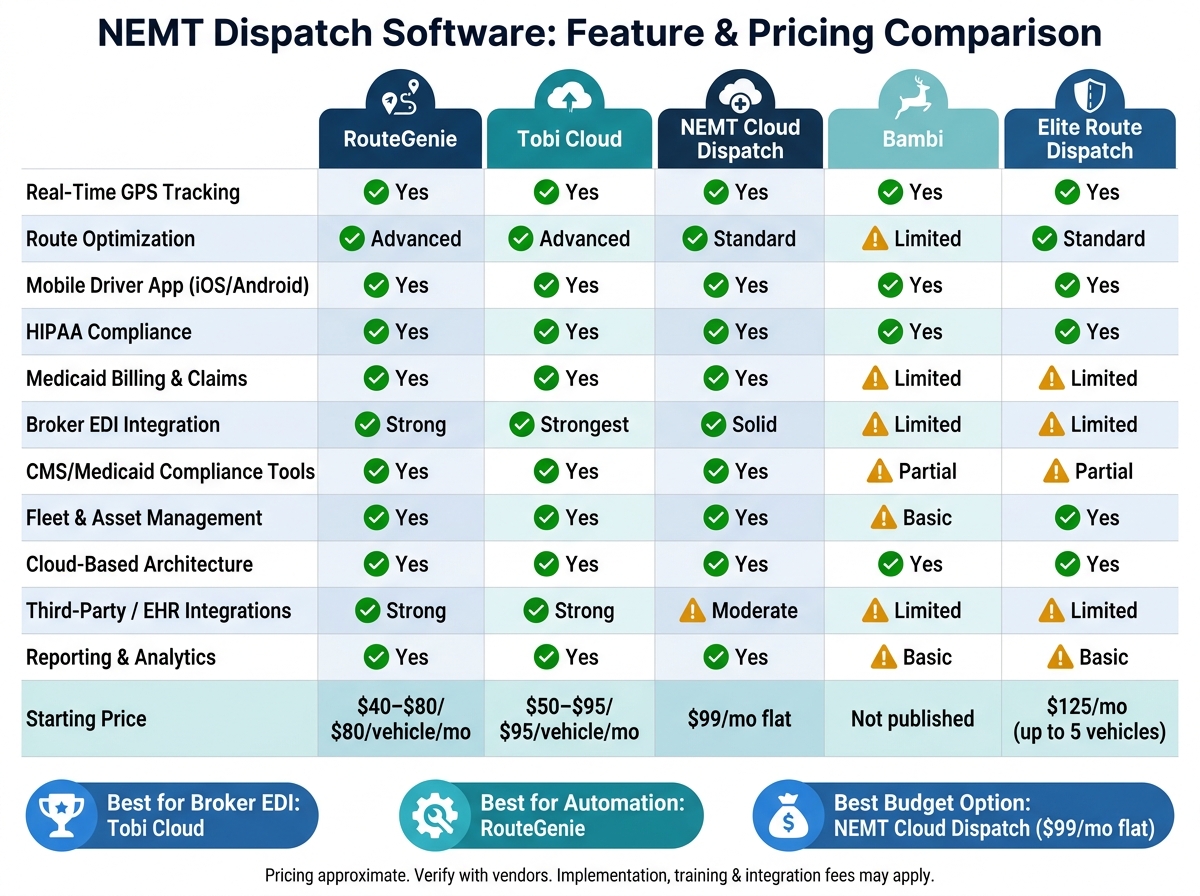
NEMT Dispatch Software Comparison: Top 5 Platforms & Key Features
Choosing the right platform depends on factors like fleet size, broker relationships, and budget. Below is a comparison of five popular NEMT dispatch platforms based on ten key features discussed in this article. Use this side-by-side reference to guide your decision.
| Feature | RouteGenie | Tobi Cloud | NEMT Cloud Dispatching | Bambi | Elite Route Dispatch |
|---|---|---|---|---|---|
| Real-Time GPS Tracking | ✅ Yes | ✅ Yes | ✅ Yes | ✅ Yes | ✅ Yes |
| Route Optimization | ✅ Advanced | ✅ Advanced | ✅ Standard | ⚠️ Limited | ✅ Standard |
| Mobile Driver App (iOS/Android) | ✅ Yes | ✅ Yes | ✅ Yes | ✅ Yes | ✅ Yes |
| HIPAA Compliance | ✅ Yes | ✅ Yes | ✅ Yes | ✅ Yes | ✅ Yes |
| Medicaid Billing & Claims | ✅ Yes | ✅ Yes | ✅ Yes | ⚠️ Limited | ⚠️ Limited |
| Broker EDI Integration | ✅ Strong | ✅ Strongest | ✅ Solid (top brokers) | ⚠️ Limited | ⚠️ Limited |
| CMS/Medicaid Compliance Tools | ✅ Yes | ✅ Yes | ✅ Yes | ⚠️ Partial | ⚠️ Partial |
| Fleet & Asset Management | ✅ Yes | ✅ Yes | ✅ Yes | ⚠️ Basic | ✅ Yes |
| Cloud-Based Architecture | ✅ Yes | ✅ Yes | ✅ Yes | ✅ Yes | ✅ Yes |
| Third-Party / EHR Integrations | ✅ Strong | ✅ Strong | ⚠️ Moderate | ⚠️ Limited | ⚠️ Limited |
| Reporting & Analytics Dashboards | ✅ Yes | ✅ Yes | ✅ Yes | ⚠️ Basic | ⚠️ Basic |
| Starting Price (approx.) | $40–$80/vehicle/mo | $50–$95/vehicle/mo | $99/mo flat | Not published | $125/mo (up to 5 vehicles) |
Key Takeaways
- Tobi Cloud stands out for its extensive broker EDI integration, making it ideal for operators managing contracts across multiple brokers, including MTM, ModivCare, and LogistiCare. Its comprehensive tools give it an edge for handling multi-state operations.
- RouteGenie shines in automation, routing, and billing. According to a RouteGenie Case Study (2026), “RouteGenie has significantly lowered intake times and increased dispatch productivity”.
- NEMT Cloud Dispatching offers a budget-friendly option with a flat $99/month fee. It includes essential features like GPS tracking, scheduling, billing automation, HIPAA compliance, and a mobile app, making it a solid choice for small fleets that don’t require advanced broker integration.
- Bambi focuses on simplicity, catering to operators who want an easy-to-use platform without extra complexities.
- Elite Route Dispatch is a strong contender for small to mid-sized fleets, offering a balance of robust features and straightforward pricing.
As one industry expert pointed out, “The real cost is rarely the per-seat price – it is implementation, training time, and broker integration fees”. Be sure to factor in these hidden costs when evaluating your options.
Conclusion
The features outlined above serve as a roadmap for operators choosing software that enhances dispatch efficiency while meeting regulatory requirements. There’s no one-size-fits-all solution – your ideal platform will depend on factors like broker mix, fleet size, and the complexity of your billing needs.
Before diving into demos or pricing comparisons, take time to identify your primary brokers, trip volume, and vehicle types. For operators managing fleets of 10 or more vehicles, a platform with robust EDI integration and automated billing reconciliation is likely essential. On the other hand, smaller fleets focused on private pay or working with a single broker may benefit more from a cost-effective and straightforward solution.
Timing your implementation is equally important. Switching software generally takes 60–90 days, including training and data migration. To avoid unnecessary disruptions, steer clear of making the switch during Medicaid renewal periods or broker audits, as these can impact your scheduling and performance metrics.
Focus on features that improve on-time performance, billing accuracy, and compliance. Use live demos to evaluate your top choices, test billing reconciliation processes thoroughly, and consider the total implementation costs – not just the monthly subscription fee.
FAQs
What’s the fastest way to tell if a dispatch system will actually reduce claim denials?
When assessing a system’s billing reconciliation features, focus on tools that handle tasks like automatic matching of denials, partial payments, and takebacks. These features can save significant time and reduce errors in your billing process.
Look for software that seamlessly integrates trip data – including timestamps, GPS breadcrumbs, signatures, and odometer readings – into an EDI 837 claim. This eliminates the need for manual data entry, cutting down on mistakes and streamlining claim submissions.
Additionally, choose platforms that validate authorizations during intake. By catching potential issues upfront, you can minimize denials and improve overall efficiency in your billing workflow.
What integrations should I require for my top brokers and payers before purchasing software?
When choosing software for trip management, it’s essential to ensure it offers direct broker integrations through API or EDI. This allows for smooth coordination with major payers like Modivcare, MTM, Veyo, Access2Care, and Verida. These integrations streamline operations by enabling real-time updates such as pickups, drop-offs, will-calls, and no-shows.
Additionally, robust billing tools are a must. Look for support for EDI 837 claims, which simplifies the claims process and ensures accurate billing. Platforms like RouteGenie, Tobi, and MediRoutes are excellent examples of software that include these capabilities.
For a more comprehensive solution, check if the software supports clinical integrations. Features like EHR connections and eligibility verification can significantly enhance efficiency and ensure seamless communication between systems.
What should I ask vendors about HIPAA security and the BAA?
When choosing NEMT dispatch software, it’s crucial to verify that the platform is HIPAA-compliant. Additionally, ask the vendor if they provide a signed Business Associate Agreement (BAA). This agreement clearly outlines each party’s responsibilities for safeguarding Protected Health Information (PHI). Without a BAA, your business could be held accountable in the event of a data breach. Look for essential security features like audit logs and granular access controls to ensure compliance and protect sensitive data.