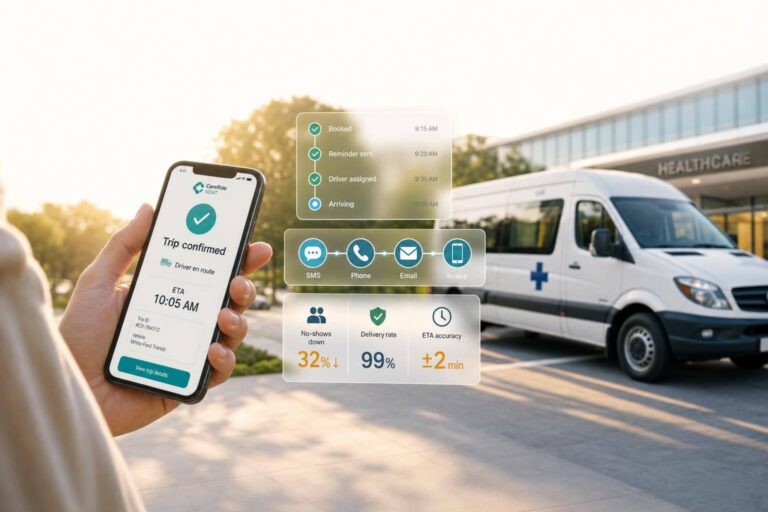
Real-time trip notifications can cut no-shows, lower rider status calls, and help dispatch keep trips on track. In NEMT, the setup is simple: tie trip events like booking confirmed, driver assigned, en route, arrived, delayed, completed, and canceled to the right message, send it through SMS, voice, or app alerts, and make sure the right person gets it.
If I had to boil this article down, here’s the short version:
- Send alerts at each trip milestone from booking to drop-off
- Route messages by role to riders, caregivers, facilities, drivers, and dispatch
- Use live GPS and driver app status to keep ETAs current
- Set clear timing rules and message templates before launch
- Clean contact data and document TCPA consent for SMS and automated calls
- Watch for failed, late, duplicate, or misrouted messages
- Track results like missed rides, on-time pickups, call volume, delivery success, and dispatcher time spent on manual updates
A few points stand out. Reminder messages help lower missed trips. ETA and arrival alerts help cut “Where is my ride?” calls. Delay and cancellation notices need to go out to everyone involved at the same time so riders, caregivers, facilities, drivers, and dispatch are not working from different information.
Here’s the workflow in plain English: a trip event happens, the system checks the rule, picks the recipient, sends the message, and logs the result. That applies to booking confirmations, pickup reminders, assignment alerts, en-route notices, arrival alerts, delay updates, trip start notices, drop-off messages, and cancellations.
| Area | What matters most |
|---|---|
| Triggers | Booking, reminder, assigned, en route, arrived, delayed, started, completed, canceled |
| Recipients | Rider, caregiver, facility, driver, dispatcher |
| Channels | SMS, voice call, app push |
| Data needed | Current phone number, contact link, consent, trip role |
| Main goals | Fewer no-shows, fewer missed pickups, fewer status calls |
| Metrics | On-time pickups, delivery rate, rider call volume, missed rides |
There’s also a clear contrast between manual calls and automation. Manual outreach depends on staff time and call answers. Automated alerts send trip details right away, keep dashboard status aligned, and help dispatch respond when a trip stops moving or pickup runs late.
Before going live, I’d focus on three things: clean rider contact records, tested timing rules, and clear opt-in/opt-out handling. After launch, I’d review results every month for the first 90 days. If the numbers do not improve within 60 days, I’d check contact data, consent settings, and trigger timing first.
In short, this article is about building a trip-notification system that sends the right update, to the right person, at the right moment, with fewer manual calls in between.
How the Notification Workflow Runs from Booking to Drop-Off
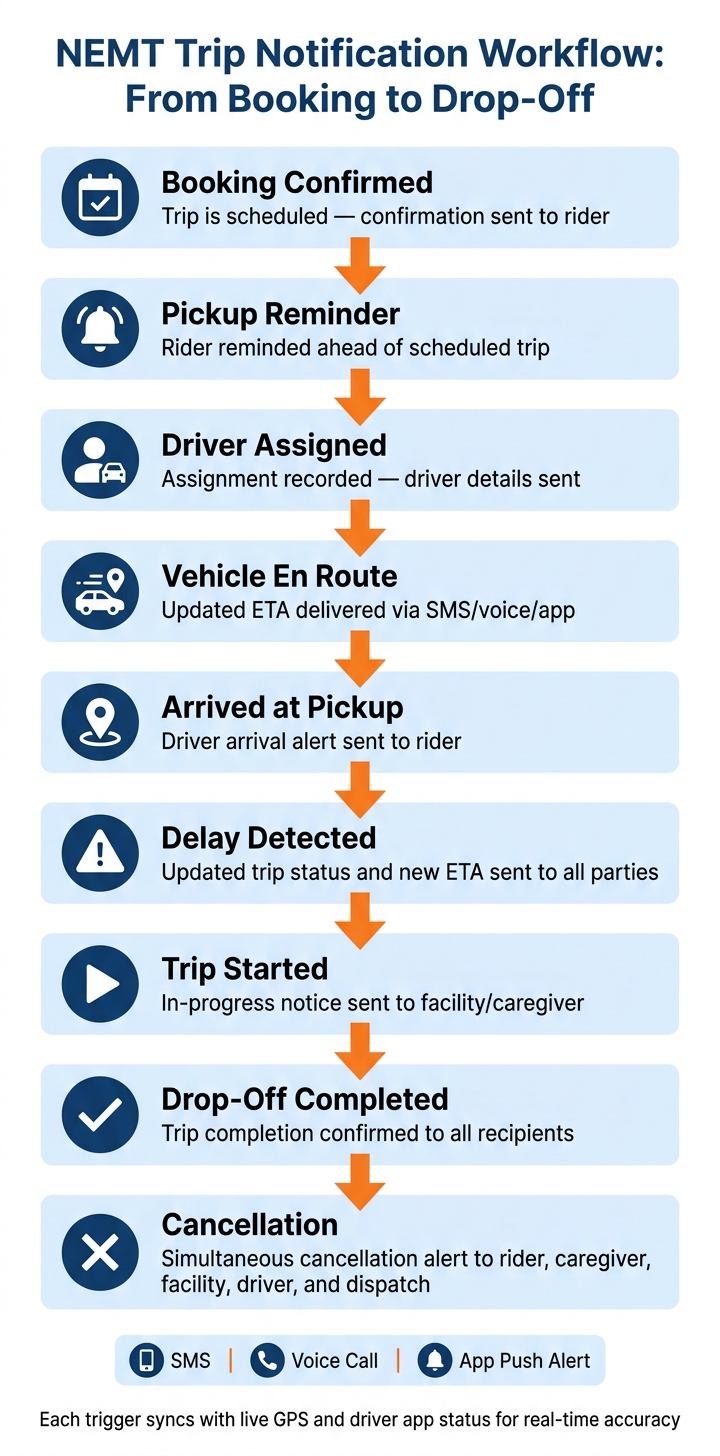
NEMT Trip Notification Workflow: From Booking to Drop-Off
Once recipients are in place, the next job is simple: match each trip event to the right message. That way, every stage of the ride can send the next update on its own, and dispatch status stays in sync from booking through drop-off. After that, dispatchers pick the channel, template, and send time for each message.
Trip Events That Trigger Messages
| Trigger Event | Message Purpose |
|---|---|
| Booking confirmed | Trip is scheduled |
| Pickup reminder | Rider is reminded ahead of the trip |
| Driver assigned | Assignment is recorded |
| Vehicle en route | Updated ETA is sent |
| Arrived at pickup | Driver has arrived |
| Delay detected | Trip status and ETA are updated |
| Trip started | Trip is in progress |
| Drop-off completed | Trip is completed |
| Cancellation | Trip is canceled |
Live GPS helps keep ETA updates current instead of leaning on a fixed estimate from dispatch time. And when driver app status changes sync with GPS, the process gets smoother: a driver updates their status in the mobile app, and the matching notification can go out right away.
How to Set Channels, Templates, and Timing Rules
After triggers are mapped, dispatchers decide how each update goes out, what it says, and when it should send. Cloud-based vs. on-premise NEMT software can connect scheduling, dispatch, GPS, and notifications to a single trip record. From there, channel choice shapes how fast updates reach riders, caregivers, and facilities.
sbb-itb-af83355
How Notifications Improve Patient Communication and Trip Reliability
Booking confirmations, reminders, ETAs, and arrival alerts take a lot of the guesswork out of a ride. They help riders know what’s happening, when it’s happening, and what to expect next. Use SMS, voice calls, and app push alerts to meet riders where they are and match different communication preferences. That also means fewer avoidable check-in calls for dispatch, a key benefit of modern NEMT dispatch software features.
Cutting No-Shows, Missed Pickups, and Status Calls
Reminders lower the odds that a rider or caregiver misses a scheduled trip. ETA updates and en-route alerts also cut status calls because people can see when the driver is on the way and when arrival is expected. For facilities, those same updates make pickup and drop-off coordination much easier.
This becomes even more important when plans shift. If a trip changes, people need clear updates right away, not a scramble of phone calls.
Communicating Delays and Cancellations Clearly
Delay alerts and early-arrival notices should include the updated pickup or arrival time. Cancellations and reschedules should go to riders, caregivers, and facilities at the same time so nobody is left guessing. When alerts are clear and sent on time, dispatch and drivers can work from the same information.
How Drivers and Dispatchers Use Alerts to Stay Coordinated
Once rider-facing alerts are set up, the next step is internal coordination. Driver and dispatcher alerts make trip changes visible in real time, so both sides are working from the same trip status.
Driver Alerts for Assignments, Changes, and Pickup Details
Drivers should get instant mobile notifications for new trip assignments, reassigned runs, cancellations, and rider delay status. Those alerts should also include pickup details and special trip notes, like wheelchair, stretcher, or escort requirements. Putting that info directly in the alert cuts down on phone calls and extra back-and-forth.
Just as important, these alerts give dispatch a better shot at spotting exceptions before they throw off the route.
How Dispatchers Monitor Trips and Catch Problems Early
Dispatchers can use live dashboard status updates to track trip progress and catch late pickups, trips that stop moving, missed arrivals, and route disruptions as they happen. When app alerts sync with the dashboard, dispatch can reassign, reroute, or step in before a delay turns into a service failure.
Manual Dispatch Communication vs. Automated Notifications
The gap is easiest to see in speed, accuracy, and visibility.
| Factor | Manual Dispatch Calls | Automated Notifications |
|---|---|---|
| Response time | Depends on someone answering or calling back | Instant delivery to driver or dispatcher |
| Trip details | More room for missed or unclear information | Specific pickup details and trip notes are delivered consistently |
| Real-time visibility | Harder to track as trips change | Live status updates stay visible in the dashboard |
| Disruption response | Slower to coordinate late pickups or missed arrivals | Helps dispatchers respond to disruptions faster |
Some cloud-based NEMT platforms bring call progress tracking, notifications, and iOS and Android apps into one dispatch view.
Setup, Troubleshooting, and Metrics for Trip Notifications
Once trip alerts are live, the job changes. Now it’s about a clean setup, fast problem-solving, and numbers you can track.
A Setup Checklist for Small NEMT Fleets
Start with contact data cleanup. Audit the rider database, confirm phone numbers are current and SMS-capable, and make sure the right contact record is linked to each rider.
Then handle consent. Under the Telephone Consumer Protection Act (TCPA), build explicit opt-in for SMS or automated calls into intake. Include a clear opt-out in every message, such as "Reply STOP to cancel." Document each rider’s communication preference too.
After that, verify templates and timing rules. Test delivery in both iOS and Android driver apps before going live. Also check that pickup details display the right way in the driver app.
If delivery still fails, isolate the source of the problem. In most cases, the issue comes from the trigger, the contact record, or the timing rule tied to the message.
Common Problems and How to Fix Them
When notifications are delayed, duplicated, or sent to the wrong person, start with the basics:
- Check trigger rules
- Review contact records
- Match trip numbers against the scheduled ride
For timing issues, compare trip settings with the actual event sequence in the notification log. Change one thing, then retest. That makes it much easier to spot what’s working before you roll the fix out across the fleet.
Once fixes are in place, watch whether notifications are cutting down on manual follow-up.
Conclusion: Key Metrics to Track After Launch
Track missed rides, on-time pickups, rider call volume, delivery success, and dispatcher time spent on manual updates.
Those numbers tell a pretty clear story. Lower rider call volume and higher delivery rates usually mean the system is doing its job and reducing manual follow-up. NEMTAC guidance also points to proactive communication and steady trip monitoring as part of reliable service delivery.
Review these metrics monthly for the first 90 days. If they don’t improve within 60 days, go back and check contact data, consent settings, and timing rules.
: Centers for Medicare & Medicaid Services (CMS). Non-Emergency Medical Transportation. cms.gov.
: Centers for Disease Control and Prevention (CDC). Transportation Barriers to Health Care in the United States. cdc.gov.
: National Emergency Medical Transportation Accreditation Commission (NEMTAC). NEMT Industry Standards and Best Practices. nemtac.org.
FAQs
What trip updates should be automated first?
Start by automating the updates that matter most to riders and staff: real-time ETA alerts, trip status notifications, driver status changes, and schedule adjustments.
These messages keep members, caregivers, facilities, dispatchers, and drivers in the loop. They also cut down on unnecessary calls and help avoid missed pickups.
How often should ETA alerts be updated?
ETA alerts should update throughout the trip, not just at the start. With real-time GPS data, operators can reflect traffic changes, accidents, no-shows, and other delays as they happen.
That means passengers and facilities stay informed from pickup to drop-off. It also gives operators a clearer view of what’s happening on the road, which makes expectation-setting much more accurate and cuts down on confusion.
What causes trip notifications to fail?
Trip notifications often break down for a few common reasons. A shaky internet connection is a big one, especially in places where signal comes and goes. And when third-party tools don’t sync the way they should, notifications can stop flowing too.
You can also run into trouble when trip data doesn’t transfer cleanly during broker-provided imports. Manual dispatch mistakes can cause the same kind of issue. On top of that, if the mobile driver app in NEMT Cloud Dispatch is inactive or out of sync, trip updates may not go out as expected, and live status tracking can fail.