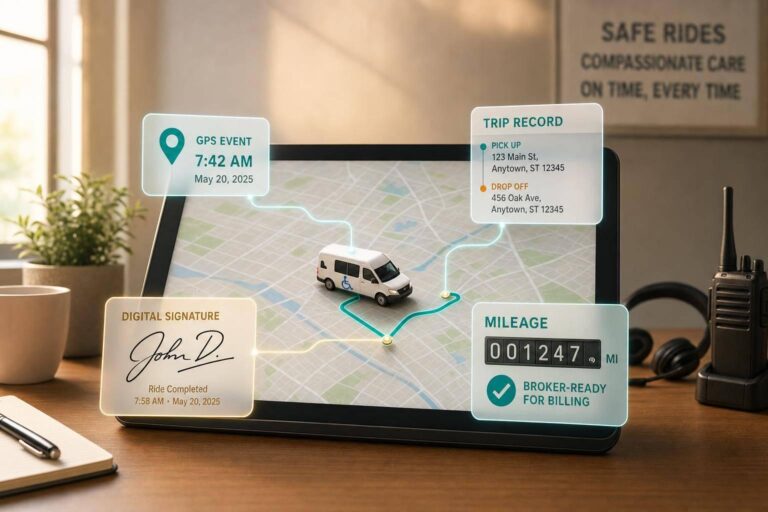
If you run NEMT, fleet tracking software should do one job first: turn every ride into a clean, billable trip record. Live GPS alone is not enough. You need trip-linked timestamps, driver and vehicle records, mileage data, alerts, geofences, and broker-ready files.
Here’s the short version:
- Basic GPS apps track cars. NEMT software tracks rides, riders, and proof of service.
- Dispatch teams need live maps and ETA updates to cut missed pickups and late arrivals.
- Billing teams need GPS-backed trip files for claims, audits, and broker reviews.
- Geofences and mobile status updates log arrivals, pickups, and drop-offs with time and location data.
- Broker and claim workflows matter. If staff must re-enter trip data by hand, errors go up.
- For small fleets, smartphone-based tools are often enough if they connect dispatch, trip records, and billing in one system.
One number stands out: a 2022 HHS OIG audit said New York improperly claimed $84.3 million in federal Medicaid reimbursements for NEMT payments that did not meet documentation rules, with another $112 million flagged as possibly non-compliant. That tells me one thing: trip proof is tied to payment.
Quick Comparison
| Option | What it does well | Main gap | Best fit |
|---|---|---|---|
| Basic smartphone tracking | Low cost, simple location view | No trip file, no billing link | Very small teams testing live GPS |
| General fleet GPS | Live map, route history, alerts | Not built for NEMT trip records | Fleets focused on vehicles, not claims |
| NEMT-specific software | Dispatch, GPS proof, billing, broker sync | Higher monthly cost | Operators that need audit-ready trip data |
If I were comparing tools, I’d focus on a short checklist:
- Trip ID linked to GPS events
- Pickup and drop-off timestamps
- Electronic signatures
- Loaded vs. deadhead miles
- Broker import/export
- CMS-1500 or 837P billing support
- Offline sync for garages and rural areas
- Will-call trip handling
That’s the core of this article: how to tell the difference between simple vehicle tracking and NEMT software that helps dispatch, records, and payment work together.
sbb-itb-af83355
Core Fleet Tracking Features That Matter in Daily NEMT Operations
Fleet tracking software for NEMT operators comes down to four day-to-day functions: live location, trip playback, alerts, and geofenced timestamps. These tools do more than show where a vehicle is. They help dispatch stay in control and give teams a clean record for each trip.
Live Map Views, Driver Location, and Trip ETAs
A live map shows every active vehicle, its status, and how far along it is on a trip. That gives dispatchers a simple but powerful view of the day as it unfolds. If one driver is running late, or another is closer to a new pickup, dispatch can shift trips before a pickup window is missed.
Accurate ETAs help on the other side too. Facilities can get clear updates without making repeated status calls, which saves time for everyone.
Still, live visibility only goes so far on its own. What matters most is having a record of what happened after the trip moves on.
Route History, Playback, and Dispatcher Alerts
Route history gives dispatchers a playback log for completed trips, including stops, idle time, and route changes. If a Medicaid broker asks whether a trip happened, or a patient says they were dropped off at the wrong spot, playback logs help verify the details.
This data also helps with driver coaching. When a vehicle keeps idling too long or drifting off route, the pattern shows up pretty fast. Over time, that can point to habits that need attention, not just one-off mistakes.
Automated alerts give dispatch another layer of control. Common alerts include:
- Speeding
- Route deviation
- Extended idling
- Late arrivals
- Missed geofence events
These alerts let teams act before a small issue turns into a billing problem or a broker compliance flag.
That record gets even better when arrivals and departures are logged at the stop without manual entry.
Geofencing for Hospitals, Clinics, and High-Volume Stops
Geofencing creates a virtual boundary around a hospital, clinic, or dialysis center. When a vehicle enters or leaves that zone, the system logs the event on its own. For recurring trips, that cuts out manual status updates and keeps arrival and departure records more consistent.
Those timestamps connect straight to the trip record, which helps support EVV-compatible trip verification. When tracking and billing work together, claims are more accurate and documentation gaps are less likely.
How Tracking Data Connects to Trip Records, Billing, and Broker Reporting
Linking GPS Events to Each Scheduled Trip
Raw GPS data only becomes useful once it’s tied to a trip record. In NEMT, the platform links each location event to a Trip ID, driver, vehicle, and timestamp, so dispatch, billing, and audits all pull from the same file.
When a driver marks a trip as "Arrived", "Picked Up," or "Dropped Off" in the mobile app, the system records the GPS coordinates and exact timestamp and connects both to that trip. So by the end of the ride, the record already shows the full timeline: driver, vehicle, location, and timestamps.
That same trip file then feeds mileage and billing records. If a broker or auditor asks for proof that the trip happened as scheduled, dispatch can pull a single GPS-verified trip record instead of piecing things together from different systems.
Using Tracking Data to Support Mileage Accuracy and Trip Documentation
Manual mileage can create audit problems when there’s no GPS proof behind it. Integrated platforms pull mileage straight from GPS route data instead of depending on driver entry. They also separate loaded miles from deadhead miles, which gives operators cleaner trip documentation for billing and internal records. From there, the data can flow into claim formats like the 837P or CMS-1500 without manual re-entry.
Billing rules change by state and broker contract, but GPS-backed mileage still holds up better than manual entry.
The next issue is where that data lives. Does it stay in one workflow, or does someone have to copy it into a separate tracking log?
NEMT-Specific Platforms vs. Standalone Tracking Tools
General fleet tools can show where a vehicle is. But that’s only part of the job. They don’t tie tracking data to NEMT trip records, signatures, or broker updates. They don’t connect location history to trip IDs, they don’t capture electronic signatures, and they don’t send status updates to brokers like ModivCare or MTM.
NEMT-specific platforms like NEMT Cloud Dispatch, TripMaster, Tobi Cloud, and RouteMatch are built around the full trip lifecycle – from scheduling and dispatch to GPS verification and billing. A RouteGenie industry resource notes that dynamic systems let dispatchers adjust routes in real time based on live GPS feedback, helping maintain on-time performance.
That matters because automation cuts down on manual re-entry and lowers the odds of documentation gaps. Standalone tools often force staff to re-key the same trip data in several places. And every manual handoff is one more spot where data can drift, get skipped, or fail an audit.
| Feature | Standalone GPS Tools | NEMT-Specific Platforms |
|---|---|---|
| Trip ID linking | No | Yes – GPS events tied to each trip file |
| Billing integration | Manual entry required | Automated (837P / CMS-1500) |
| Broker reporting | Manual portal updates | API or CSV sync (ModivCare, MTM) |
| EVV compliance | Not designed for it | Built-in GPS + signature capture |
| Loaded/deadhead miles | Not tracked | Tracked and categorized automatically |
Those tradeoffs shape how much hands-on work the fleet still has to do, and choosing the right tools is a key part of NEMT fleet management to control operational overhead.
How to Compare Fleet Tracking Software for a 1 to 50 Vehicle NEMT Fleet
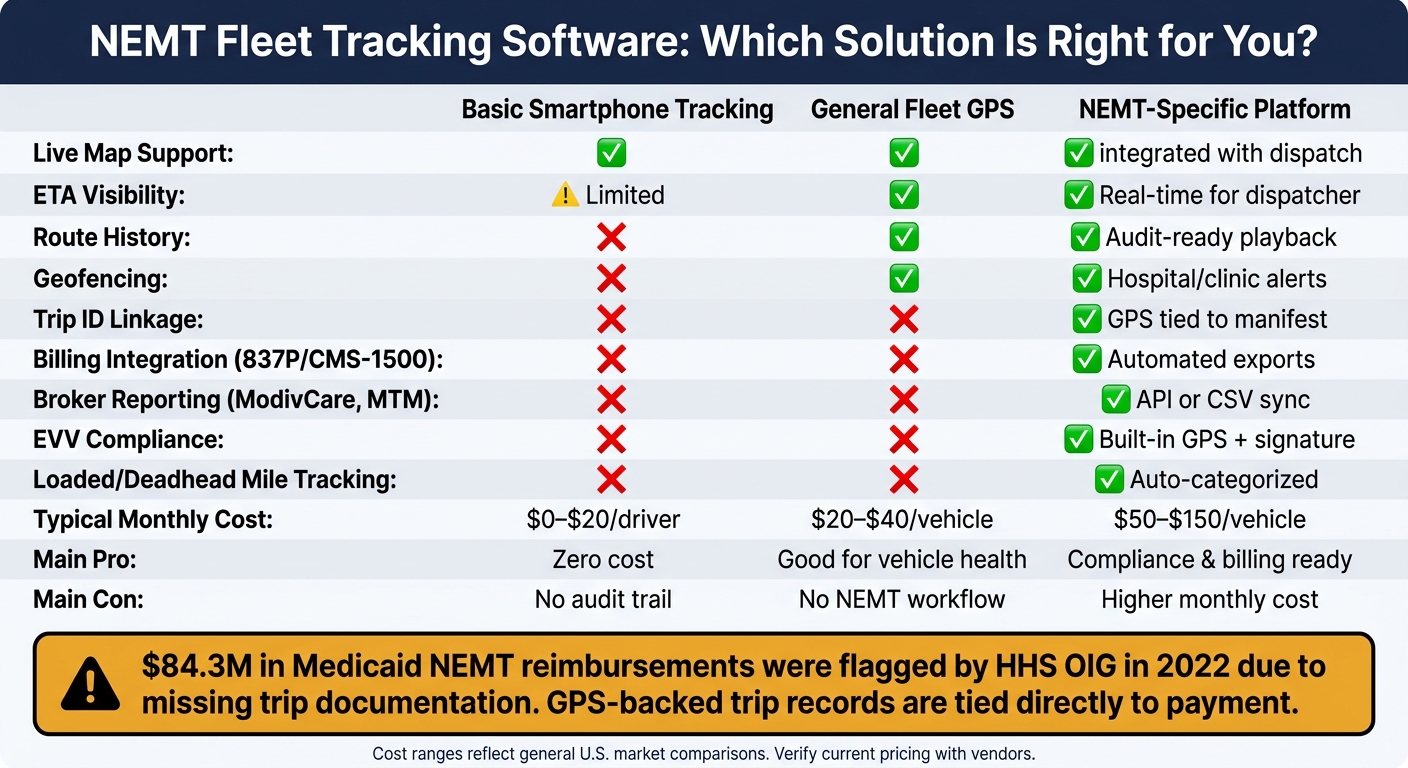
NEMT Fleet Tracking Software: Basic GPS vs. General Fleet vs. NEMT-Specific Platform
Once tracking data is tied to trips, the comparison gets much more useful. At that point, the question isn’t just, "Can I see my vehicles on a map?" It’s whether the system helps with dispatch, billing, and broker reporting.
For small NEMT fleets, that’s the whole game. You need software that turns GPS data into trip records, billing records, and broker-ready documentation. That closes the gap between a completed ride and a submitted claim.
The Features Worth Paying For First
For fleets with 1 to 15 vehicles, keep the focus on the basics that save time every day:
- Simple trip entry
- A clean driver mobile app
- GPS-verified pickup and drop-off timestamps
- Electronic signature capture
- Direct trip-to-billing handoff
- Recurring trip support for dialysis runs
Once a fleet grows to 16 to 50 vehicles, the needs change a bit. Now you’re dealing with more moving parts, so dispatch control matters more. The higher-priority features become multi-vehicle dispatch with exception alerts, broker data imports by CSV or API, driver scorecards, and credential tracking and HIPAA compliance.
On the flip side, call-center workflows and enterprise credential management are usually more than this fleet size needs. That’s extra software, extra cost, and often extra friction.
One more thing: most NEMT platforms rely on smartphone driver apps, not proprietary hardware. That’s a big deal for smaller operators because it cuts setup time and keeps hardware headaches to a minimum.
These priorities draw a clear line between basic vehicle tracking and software that supports day-to-day NEMT work.
Comparison Table: NEMT Software Categories, Features, and Tradeoffs
The table below checks whether GPS events turn into auditable trip files, not just map pins.
| Feature | Basic Smartphone Tracking | General Fleet GPS | NEMT-Specific Platform |
|---|---|---|---|
| Live map support | Yes | Yes | Yes, integrated with dispatch |
| ETA visibility | Limited | Yes | Yes, real-time for dispatcher |
| Route history | No | Yes | Yes, audit-ready playback |
| Geofencing | No | Yes | Yes, hospital/clinic alerts |
| Trip linkage | No | No | Yes, GPS tied to manifest |
| Billing integration | No | No | Yes, 837P / CMS-1500 exports |
| Driver app | Yes | Sometimes | Yes, NEMT-specific workflow |
| Typical monthly cost | $0–$20/driver | $20–$40/vehicle | $50–$150/vehicle |
| Main pro | Zero cost | Good for vehicle health | Compliance and billing ready |
| Main con | No audit trail | No NEMT workflow | Higher monthly cost |
Cost ranges reflect general market comparisons .
Per-trip pricing can look cheap at first glance. But charges like $0.10 per trip on some tiers can pile up fast on busy days. That’s why a 12-month total cost projection gives you a much better read than base pricing alone.
Vendor Review Checklist for U.S. Operators
Use the demo to test the workflow, not just the feature sheet. A polished sales screen can look great, but what matters is whether the software keeps live-location proof attached to the trip all the way through billing and broker reporting.
- Trip capture: Ask the vendor to show exactly how a pickup event is logged in the driver app and where that timestamp appears in the trip record. Then have them walk through the full trip-to-claim flow, all the way to a populated 837P or CMS-1500 form.
- Offline syncing: Make sure the app stores GPS data in low-signal areas and syncs on its own when service comes back. Hospital garages and rural clinic parking lots are common dead zones.
- Broker integration: Check whether broker connections use a full API or CSV uploads. CSV can work, but it still means manual pulls and uploads.
- Alerting and will-call support: Verify that dispatchers can set custom alerts for geofence exits and expiring driver credentials. Also confirm that the system can handle will-call returns, or on-demand pickups, without throwing off the day’s schedule.
Deployment Best Practices and Conclusion
Roll Out Tracking in Phases Without Disrupting Service
Once you choose a platform, the rollout matters just as much as the feature set.
Start with a pilot. Put live GPS on two or three vehicles first. That usually cuts check-in calls and gives dispatch a live view of the fleet. Most operators can get live GPS running in 1 to 2 weeks.
When that setup is stable, add geofencing, automated reporting, and billing workflows. When tracking connects to billing, teams often spend less time on daily admin work. For broker integration and historical data, plan for a 30-day migration window.
Field-first driver apps also make training easier. After the pilot settles in, move from launch mode to performance review.
After go-live, review on-time performance, idle time, and route exceptions every month. Measure adoption and results against the same outcomes that matter most: on-time performance, cleaner trip records, and fewer manual calls.
| Timeframe | What to Measure |
|---|---|
| 30 days | Driver app adoption; live GPS on all trips; real-time ETA visibility |
| 60 days | On-time performance; clean claim rate; fewer dispatch calls |
| 90 days | Audit-ready documentation; claim approval rate; reduced manual entry |
It also helps to set a clear location-permission policy before launch. Spell out dispatcher steps for will-call returns and hospital discharges. Drivers should know when the app tracks their location and how that data shows up in trip records. That kind of clarity up front can prevent confusion and help build trust.
Conclusion: What the Right Tracking System Should Improve
The right fleet tracking software should do more than show where vehicles are. For a U.S. NEMT operator, it should tie each GPS event to a trip record so billing and broker workflows have clean documentation.
That connection turns a completed ride into a billable record.
FAQs
Do I need NEMT-specific tracking or just GPS?
No. Basic GPS can show a vehicle’s live location, but that alone doesn’t cover what NEMT teams need day to day.
NEMT-focused platforms tie GPS data directly to trip records. That connection supports EVV-style timestamps, mileage tracking, electronic signatures, broker imports, mobility matching, multi-stop routing, real-time trip status, cancellations, and claims without manual entry.
What trip proof do brokers usually require?
Brokers usually want clear, verifiable trip proof before they approve a claim. The goal is simple: confirm what happened and cut down on fraud.
That proof often includes GPS-based pickup and drop-off timestamps, electronic signatures from riders or facility staff, and accurate mileage records.
They may also ask for complete trip logs and steady status updates that show the trip was finished on time and in line with contract terms. When you store this data digitally, you create an audit-ready trail that can help reduce denied claims.
Can a smartphone app work for a small NEMT fleet?
Yes – but usually only if it’s part of a dedicated, cloud-based NEMT platform.
Basic map apps can help with single trips. But they don’t handle multi-vehicle dispatch, mobility matching, broker import, EVV-compliant documentation, or billing integration. Small fleets often outgrow them once they start managing recurring trips or running more than two to three vehicles.